
Marketplace
Walmart Connect in 2026: The Guide To Launch a Successful Campaign




Written by Darkroom leardership
11 min read
October 13, 2026

Walmart’s global advertising business is on a serious growth streak, jumping 46% to almost $6.4 billion in fiscal 2026. Brands are no longer just testing the waters; they are shifting significant budgets into Walmart’s retail media. In the US, Walmart Connect rose 43% in the quarter ending 31 July 2026.
The tricky part is figuring out exactly what’s on offer. Walmart Connect lets marketers launch search ads themselves, sometimes within hours, or plan in-store screen campaigns directly with Walmart’s team. Each format has its own pricing structure, which can be confusing.
This guide breaks down every ad format, explains how in-store and onsite ads can work together, outlines what each format costs, and shows how to measure the results.
Key takeaways
Two businesses in one account: a self-serve auction for search and display, and a planned media business for store, offsite, and CTV ads.
Start with search: Sponsored Products run on a cost-per-click auction, and Walmart recommends a $100 daily budget.
Plan store ads with a partner: screens, audio, TV walls and sampling are booked with Walmart Connect's team or an ad partner.
No rate card, clear models: Walmart publishes how each format is bought and what it recommends for search, and no average CPCs or CPMs.
Judge on incremental sales: Walmart tracks sales across its site, app and stores, and a holdout test tells you which of those sales your ads caused.
What is Walmart Connect and how does it work?
Walmart Connect is Walmart’s advertising platform, letting brands place ads across Walmart’s website, app, physical stores, and even partner channels. What sets it apart is that Walmart’s shopping data powers these ads, making them highly targeted.
If Amazon Ads rings a bell, the concept is similar, but Walmart takes it a step further by including ads in its actual stores, not just online.
This is retail media in the fullest sense. Walmart reaches about 150 million customers every week in the US, whether they’re shopping in one of over 4,600 stores, browsing the website, or using the app.
There are two main groups of advertisers on Walmart Connect. First, suppliers are brands that sell their products directly to Walmart, which then sells them to shoppers. Then there are marketplace sellers, who list and sell their own products directly on Walmart.com, similar to how third-party sellers work on other marketplaces.
To get started, advertisers use Walmart Connect’s Ad Center. Suppliers log in with their Supplier Center credentials, while marketplace sellers use their Seller Center accounts. Both groups can also work with an ad partner to set up and manage their campaigns.
Which Walmart Connect ad formats can you buy?
Walmart Connect ads fall into five groups: sponsored search, onsite display, Brand Shop and Shelf, offsite media, and store ads. Each one does a different job and is bought differently.

Sponsored Search: Sponsored Products, Sponsored Brands and Sponsored Videos
Sponsored Products appear when shoppers search on Walmart's site and app, and on item pages. Sponsored Brands put your logo, story and products in premium placements. Sponsored Videos are short, shoppable videos inside search results.
Walmart says supplier sales attributed to Sponsored Search rose 38% year over year (Walmart first-party data, February 2024 to January 2025). That's Walmart grading its own product, so read it as direction and test your own lift.
Onsite Display
Walmart display ads run in five placements: Gallery, Marquee, Brand Box, Skyline and Tile. You can target by behavior (online and in-store purchase history), keyword, context or run of site.
Walmart says Onsite Display reaches 87% of US households. It's open to eligible brand owners and authorized brand representatives.
Brand Shop and Shelf
A Brand Shop is a shoppable storefront on Walmart's site and app, exclusive to your brand. A Shelf groups products around a season, theme or category, and can serve as the landing page for display campaigns.
You need to be a Walmart supplier, or a marketplace seller with at least one brand registered in Walmart's Brand Portal or Supplier One. Use a Shelf as the landing page for seasonal display, so paid traffic lands on a curated set of products.
Offsite media, Walmart DSP and CTV
Offsite media takes Walmart's shopper data off Walmart. Walmart DSP is powered by The Trade Desk, VIZIO Home Screen ads appear when a VIZIO TV powers on, and social campaigns run on Meta, TikTok and Pinterest.
Walmart reports a 28% online attributed sales increase among CTV audiences, from 133 offsite CTV campaigns measured on a 14-day pre/post window (February 2024 to January 2025).
Store ads
Store ads cover digital screens across store areas, including Deli and Bakery, in-store audio and Walmart Radio, TV walls, in-store demos, events, and pickup and delivery sampling.
They're the format an online-only network can't sell you. The next section shows how they connect to everything above.
Read also: Walmart DSP Marketing 2026 - A Full Funnel Programmatic Playbook
How do Walmart in-store ads and onsite ads work together?
Walmart's in-store and onsite ads reach the same shopper with the same data, so you can plan them as one campaign. Onsite ads find the shopper while they plan the trip. Store ads catch them at the shelf.
Walmart in-store advertising draws on the same purchase history as Onsite Display, which already targets shoppers based on their online and in-store purchases. Walmart's closed-loop measurement then tracks sales across its site, app, and stores.
Here's what the store side delivers, by Walmart's own numbers:
TV walls: a standard TV wall campaign reached 180 million customers in Walmart stores (Walmart first-party data, February 2025).
Deli and Bakery screens: food suppliers saw up to 5% sales lift in proof-of-concept testing from September 2024 to January 2025, validated at the 80% confidence level or above.
How should you sequence in-store and onsite?
Win search first: make sure Sponsored Products and item pages convert before you pay for attention in the aisle.
Put the screen near the shelf: run store screens in the department where the product sits, while Onsite Display keeps it in front of the same shopper online.
Use sampling for trial: pickup and delivery sampling puts the product into a shopper's order, which suits launches and new flavors.
Measure both channels together: a store screen can drive an online order, and an onsite ad can drive a store purchase, so judge the campaign on combined sales.
That's what Walmart in-store retail media adds to a plan: reach at the moment of purchase, measured against the same receipts as your online ads.

How do you launch a campaign in Ad Center?
Sign in to Ad Center with your Supplier Center or Seller Center credentials, create a Sponsored Products campaign, and give it a budget that runs all day. Walmart's setup guide runs in this order:
Campaign type: choose Sponsored Products.
Targeting: Automatic campaigns suggest product types, and Manual campaigns suggest keywords.
Bidding: Dynamic Bidding adjusts bids in real time.
Budget: $100 a day is the recommended floor, and out-of-budget alerts appear in near real time.
Review: recommendations and key metrics refresh every 24 hours.
Want help running it? The Walmart Connect Partner Network lists agencies and technology providers in three tiers: Partner, Premium Partner, and Premium+ Partner. Tiers are set by annual spend with Walmart Connect, product adoption, and policy compliance.
Once search is live, build the rest of the program in five steps:
Audit coverage: list the formats you run and the funnel stages with no spend.
Align audiences: use Walmart's first-party audiences for display and offsite media.
Unify creative: carry one message from search to display to store screens.
Test incrementality: hold out a region before you scale a new format.
Scale budget: move spend toward the formats that prove lift.
How to Build a Successful Walmart Connect Campaign
A successful Walmart Connect campaign starts with search on item pages that convert, then adds display, Brand Shop, and store ads once search pays for itself. Here's the order to run it in, one step at a time.
Step 1: Make your items eligible and ready to convert
Sponsored Products are available only for items that are in stock, have the Buy Box, and are published on Walmart.com. For Sponsored Brands and Sponsored Videos, a registered trademark and a brand that is onboarded to the Walmart Brand Portal are also required.
Next, optimize the item page each ad directs shoppers to. Walmart's sponsored search best practices recommend focusing on a few key areas to make sure your ads perform at their best.
Start with content: Make sure titles, descriptions, images, and key features are all up to date and accurate. Also double-check that the item is listed in the correct category, since this helps shoppers find what they are looking for.
Keywords: use the terms shoppers are actually searching for. These can be found in the Keyword and Item Keyword reports. Including these terms in your item descriptions can help your products show up more often in relevant searches.
Stock: keep inventory ahead of the sales you expect from ads, because an item that goes out of stock stops serving.
Step 2: Set your maximum bid from your margin
Before diving into Ad Center, it helps to know exactly what a click is worth. To figure this out, multiply the average order value by the conversion rate and then by the margin after accounting for cost of goods and any fees. This quick calculation gives a clear idea of what makes sense to spend per click.
For example, let’s say the average order is $30, the conversion rate is 10%, and the margin after costs and fees is 30%. In this case, the break-even bid comes out to $0.90 per click. That’s $30 times 0.10 times 0.30, following the Darkroom model.
A few exceptions apply. It can make sense to bid above break-even for new product launches or for products that need extra support. Just be sure to set an end date for these higher bids so they don’t run indefinitely.
Walmart uses a second-price auction, which means you’ll never pay more than your maximum bid. That makes the break-even number a safe ceiling to use when setting bids.
Step 3: Launch an automatic campaign to find search terms
To get started, sign in to Ad Center using your Supplier Center or Seller Center credentials. Once inside, set up a Sponsored Products campaign and select Automatic targeting.
This option lets Walmart match your products to relevant customer searches based on their product-type suggestions, making it easier for your items to show up where shoppers are looking.
Here’s what you should look out for:
Ad groups: group similar products that share keywords, which helps Walmart's algorithm read relevance.
Budget: start at the $100 a day Walmart recommends, so your ads stay live through peak hours.
Bidding: choose fixed bidding if you plan to add negative keywords, since negatives work in automatic campaigns only on fixed bids.
Step 4: Move proven search terms into manual campaigns
After running an automatic campaign for a few weeks, it is a good idea to check which search terms are actually driving conversions in the Item Keyword report. These are the terms that shoppers are using to find and buy your products. Take those high-performing search terms and add them to a Manual campaign. It is also worth including any Suggested Keywords that are a good match for your items, so you can expand your reach to similar shoppers.
When setting up your Manual campaign, it helps to follow Walmart's recommendations for bidding by match type. This approach lets you control how closely your ads match shopper searches.
Exact match: the highest bid, for terms with proven sales.
Phrase match: a middle bid, for terms that are still growing.
Broad match: the lowest bid, for discovery.
If you are launching a new product, ty bidding above the Suggested CPC to help your ads stand out early on. It is also smart to enable item page placements, since these spots tend to be less competitive than search results and can give your product more visibility.
Step 5: Cut wasted spend with negative keywords
Walmart rolled out negative keywords for Sponsored Products on July 29, 2026, giving advertisers more control over where their ads appear. These can be added to manual campaigns, and also to automatic campaigns if fixed bidding is enabled. This update helps ensure ads only show up for searches that are truly relevant.
Negative exact: blocks a search that matches the term exactly, such as "dog food".
Negative phrase: blocks any search that contains the phrase in order, so "running shoes" also blocks "white running shoes".
It is a good idea to review your search terms every week and add negatives for any terms that are getting clicks but not leading to sales. For suppliers with large catalogs, negative keywords can also prevent your own products from competing against each other for the same searches, saving budget and improving overall performance.
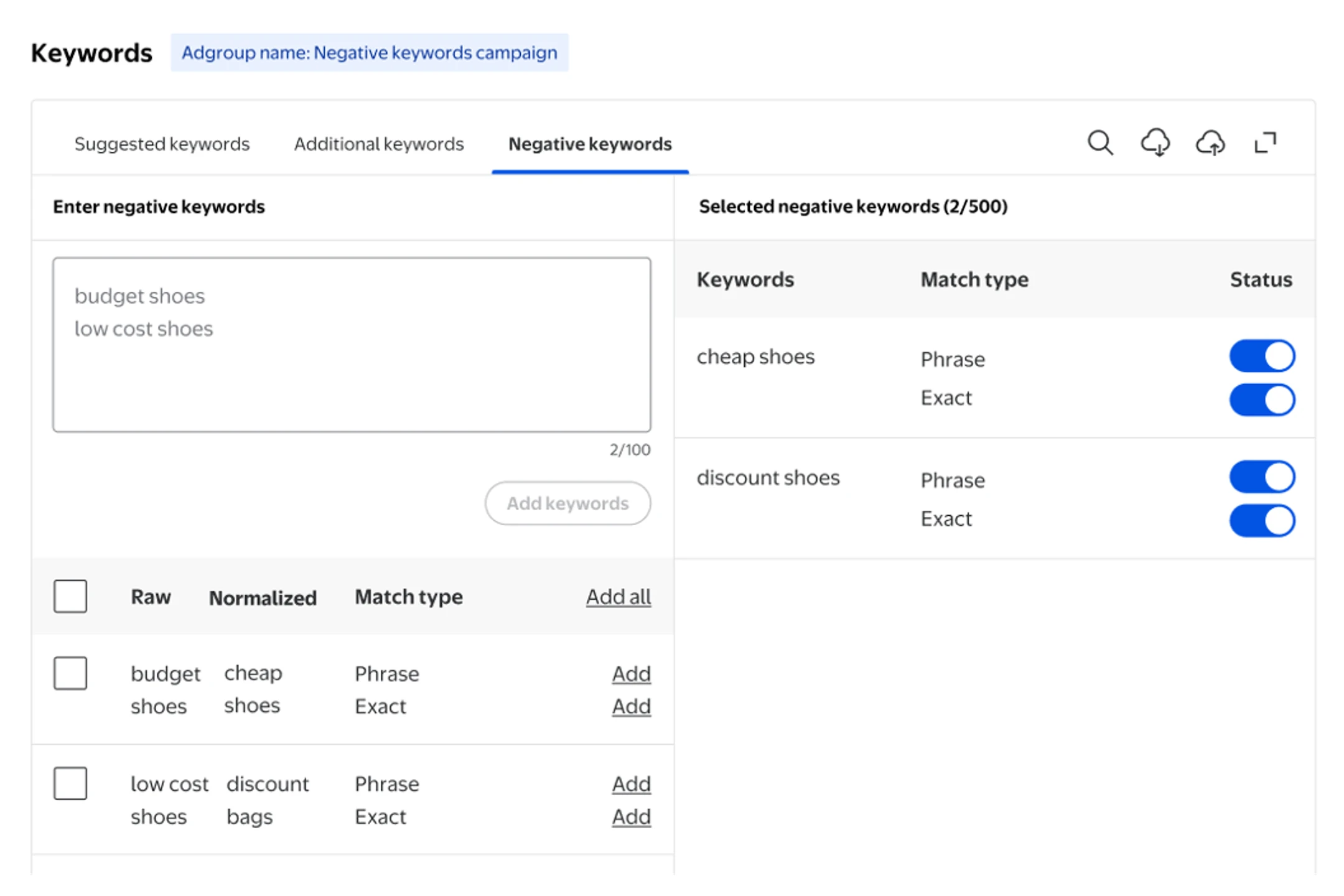
New feature of negative keywords in Walmart Connect. Source: Walmart Connect.
Step 6: Tune placements, devices, and budget every week
Ad Center updates its recommendations and key metrics every 24 hours. This means that checking in once a week provides enough fresh data to make informed decisions and spot trends that need attention.
Placements: use the Placement report and raise bid multipliers on the placements with the best ROAS.
Devices: do the same for page and device types with platform multipliers.
Budget: if a campaign keeps hitting its daily cap, test a higher cap, and set alerts so you hear about it the same day.
Peaks: Walmart's guide says search works best when it's always on, so raise caps for peak periods and keep campaigns running between them.
Step 7: Add display, Brand Shop and store ads once search converts
Search helps you connect with shoppers who already know what they want. The following formats are designed to reach those who are still exploring.
Onsite Display: target shoppers by their online and in-store purchase history, by keyword or by context.
Brand Shop and Shelf: send display traffic to a Shelf built around a season or theme, so clicks land on a curated set of products.
Store ads: brief Walmart Connect's team or a partner on screens near your shelf, and carry the same message as your search and display creative.
Offsite and CTV: use Walmart DSP to reach Walmart shoppers on other sites and screens.
Step 8: Prove lift before you scale a new format
Before rolling out a new format across all regions, test it in a specific area first. Tracking both online and in-store sales during this test makes it easier to see what’s really working. Once the results are in, shifting more budget to the formats that actually drive sales can make a big difference.
How do you measure Walmart Connect results?
Walmart Connect will show the sales that are attributed to your ads, while a holdout test reveals the actual sales your ads caused. Both measurements are important for the full picture.
Walmart breaks down results in four main ways: attribution, incrementality, brand impact, and campaign insights. For store ads, both brand lift and sales lift are measured, so you can see how your ads are driving awareness as well as actual purchases.
Before comparing Walmart’s results with Amazon or Instacart, check with your account team to find out which attribution window each report uses. A longer window can make any network’s numbers look stronger. Here are three questions to have ready for that conversation:
Attribution window: how many days after a click or view does a sale count, and does it differ by format?
Store sales: which store purchases are matched to ad exposure, and how?
Incrementality: which formats can run a Walmart lift study, and at what spend?
It’s also a good idea to run your own test. A geo holdout test lets you compare markets where you are spending on Walmart ads with those where you are not. Since Walmart sells both online and in-store, make sure to include both channels in your analysis for a complete view.

Walmart Connect's dashboard for ad campaigns. Source: AiHello
Where does Walmart fit in a retail media plan?
Walmart is the network in your retail media plan that joins online and in-store shopping: one buy reaches shoppers on Walmart's site and app, on other sites and TVs, and in more than 4,600 US stores. Most brands run Walmart retail media next to Amazon and grocery networks like Instacart Ads, and each network does a different job.
Network | Where the ads run | Its job in your plan |
|---|---|---|
Walmart Connect | Walmart's site and app, Walmart DSP, VIZIO TVs and US stores | Online and in-store sales from one buy, measured against the same sales data |
Amazon Ads | Amazon's store, Amazon DSP and Prime Video | Online demand on the Amazon marketplace |
Instacart Ads | Instacart Marketplace, retailer sites running Carrot Ads and Caper Cart screens | Grocery orders from the 1,400+ retailers that stock your products |
What Walmart adds to the plan
Three things set Walmart apart in a plan with several networks:
Store reach: Walmart serves approximately 150 million customers a week in the US, and its store ads put screens, audio, and sampling in the aisle where they shop.
Shared data across channels: Onsite Display targets shoppers by their online and in-store purchase history, and closed-loop measurement ties ads to sales on the site, the app and in stores.
Reach beyond Walmart: Walmart DSP and VIZIO Home Screen ads carry Walmart's shopper data to other sites and TVs.
How Walmart's role changes with how you sell
Where your products sell decides which part of Walmart you use most:
Suppliers in Walmart stores: plan Walmart as your omnichannel network, with search, display and store ads judged on combined online and store sales.
Marketplace-only sellers: your items sell online, so Walmart works as a search network first, alongside Amazon, with display and offsite added once search pays back.
Grocery and household brands: Walmart covers its own stores and site, and Instacart covers delivery orders from the other retailers that stock you.
How much budget to give Walmart
Set Walmart's share with the same three tests you use for every network:
Sales: start close to Walmart's share of your retail sales.
Margin: let the networks where you keep more per order carry a higher bid ceiling.
Lift: move budget toward the networks whose holdout tests show incremental sales.
Before you raise Walmart spend, check the operational side with the seller KPI benchmarks on Amazon and Walmart. Our retail media team runs Walmart Connect as one part of that plan.
Run Walmart as part of one retail media system
Walmart Connect works best when it's planned with everything else your shopper sees. The same customer buys on Walmart, Amazon and Instacart in the same week.
Darkroom runs Walmart Connect, Target Roundel and Instacart as one retail media program, with a senior strategist owning your retail media P&L and every network measured on contribution profit and incrementality.
Audit and planning take the first one to two weeks, and campaigns are rebuilt and live by week four.
Frequently asked questions
Is Walmart Connect the same as advertising on Walmart Marketplace?
Walmart Connect is the advertising business for everyone who sells on Walmart, both first-party suppliers and third-party marketplace sellers. Both buy ads in the same Ad Center, signing in with Supplier Center or Seller Center credentials.
How much budget do you need to start on Walmart Connect?
Walmart publishes no hard minimum for Sponsored Products, but it recommends a daily budget of $100 to stay visible at peak hours. Walmart Connect advertising on search is paid per click, so spend follows traffic. Sellers who go live on Walmart Marketplace in February 2026 or later can get up to $500 in Walmart Connect ad credits.
Can you buy Walmart in-store ads yourself?
Walmart's store ads page describes no self-serve option. It points advertisers to its team and partner directory to plan screens, audio, TV walls and sampling, while search and small-business display run in Ad Center. Ask for brand lift and sales lift measurement in the same proposal, since Walmart measures store ads on both.
What is the Walmart Connect Partner Network?
It is Walmart Connect's program for agencies and technology providers that manage campaigns or build on its APIs. It has three tiers, Partner, Premium Partner and Premium+ Partner, set by annual spend with Walmart Connect, product adoption and policy compliance. Higher tiers get a badge and higher placement in Walmart's partner directory.
How long does a Walmart Connect campaign take to show results?
Ad Center refreshes recommendations and key metrics every 24 hours, so search campaigns can be tuned within the first week. Judging incremental sales takes longer: plan a full quarter for a holdout or geo test that covers online and store sales, and longer for store ads tied to seasonal resets.