
Paid Media
12 Franchise PPC Expert Tips To Generate More Leads




Written by Darkroom leardership
8 min read
Oct 16, 2026

Once a franchise system reaches around 40 locations, three big decisions start to shape paid search: who controls the accounts, how leads reach territory-mapped campaigns, and how leads get routed to the right location.
The 12 tips below walk through each of these areas in order: first, account ownership, then territories and campaign structure, and finally, lead tracking and reporting. Each tip also highlights the specific Google Ads setting that helps put it into practice.
Key takeaways
The franchisor should own every Google Ads account through a manager account, so campaign history and conversion data stay with the brand when an agency or franchisee leaves.
Name every paid search campaign after the pool that funds it, whether that is the brand fund, a regional co-op, or a franchisee's local marketing requirement.
Google doesn't restrict trademarks used as keywords, so brand-term rules for franchisees must live in the franchise agreement.
A lead counts once it carries a location ID into your customer relationship management (CRM) system and returns to Google Ads as a booked job through enhanced conversions for leads.
Local Services Ads started moving into Google Ads as Performance Max campaigns with pay-per-lead goals in August 2026, so every location needs an accurate Business Profile and a corporate account admin.
Why does franchise PPC break past 40 locations?
Franchise PPC tends to hit a wall when the system outgrows its original setup. With just five locations, one person can easily keep an eye on every campaign. But with 40 locations, things get a lot more complex. Now you have dozens of accounts to manage, three different funding pools, and a single brand name everyone wants to bid on.
There’s no hard-and-fast rule for when things get tricky, but 40 locations is a good benchmark. By that point, it’s just not realistic for one person to review every account each week.
At this scale, three main problem areas tend to pop up:
Brand overlap: corporate and franchisees bid on the same brand terms.
Unreconciled funding: three pools pay for search, and nobody knows which dollar bought which lead.
Orphan leads: calls and forms reach the CRM with no location attached.
According to WordStream’s 2026 benchmarks, which reviewed 13,000+ US search campaigns across 23 industries, the average Google Ads cost per click is $5.42, and the average cost per lead is $66.69. These are broad averages, so it’s important to check what’s typical in your own industry. At these costs, every untracked lead is money that’s hard to justify to franchisees.
So which model should you run?
Read also: Franchise Marketing at the System Level: One Brand, Every Location
How the Franchise PPC Model is Structured
Franchise PPC usually follows one of three main models, and the differences come down to three key questions: who owns the advertising accounts, who manages the campaigns, and who covers the costs.
Corporate-managed
In this setup, the franchisor controls the advertising accounts, and the corporate team or its chosen agency manages all campaigns. The budget typically comes from the brand fund, and franchisees sometimes pay local fees.
This model works well for brands that want a single, unified voice and consistent data. It also keeps things straightforward because one team can oversee all accounts. The downside is that franchisees contribute to budgets they can't see, which can make it harder for them to trust the process when they only see results as a single, system-wide number.
Franchisee-managed
Here, each franchisee manages their own advertising account, either independently or with help from a local agency. They pay for it out of their required local marketing budget.
This approach suits newer franchise systems with limited central marketing staff, since it is inexpensive for corporate to get started. The trade-off is that every new location creates another account that corporate cannot access, and multiple franchisees might advertise the brand name at the same time.
Hybrid
With the hybrid model, the franchisor owns all accounts through a manager account. Corporate sets up the overall structure and guidelines, but franchisees can customize local offers and track results for their own territories. Funding can come from the brand fund, co-op contributions, and local budgets, with each source clearly linked to its own campaigns.
Larger franchise systems often move to this model when franchises handle most local spending and want more control over their marketing. The hybrid approach lets corporate keep the overall structure and account ownership, while giving each franchisee transparency into their own results. The next 12 tips will walk through how to set up this model, starting with the accounts.
12 franchise paid search tips that generate more leads
Each tip pairs a decision the franchisor owns with the Google Ads setting that enforces it.
1. Put every account under a manager account the franchisor owns
Start with an inventory: every Google Ads account that touches your brand, who holds admin access, and which manager account it sits under. Expect accounts opened by franchisees and accounts still linked to former agencies.
Next, link each one under a corporate manager account with ownership turned on. An owner manager account can invite and remove admin users and transfer ownership, while the client account keeps its own data.
Why does it matter? Unlinking is where franchise Google Ads programs lose their measurement. When an account leaves a manager account, the manager's shared remarketing lists stop populating, and its cross-account conversion tag stops recording. If that manager account belongs to a former agency, your conversion tracking stops the day they unlink.
2. Tag every paid search dollar to the pool that funds it
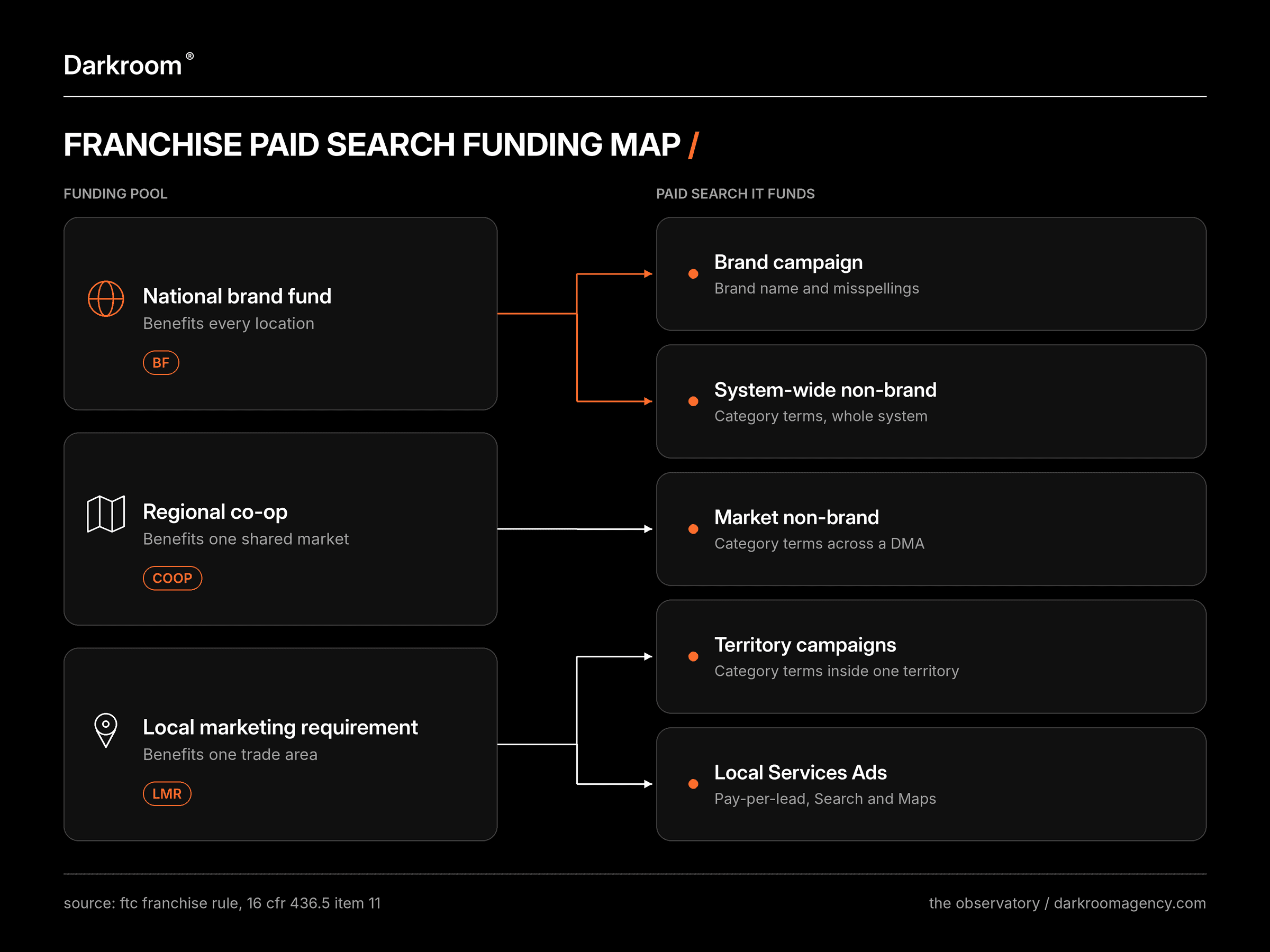
Item 11 of the FTC Franchise Rule requires franchisors to disclose their advertising co-ops and funds, including how each co-op's area is defined, how much members contribute, whether it runs on written governing documents, and how the fund was used in the last fiscal year.
Paid search should follow the same lines. A co-op usually maps to a designated market area (DMA), the TV market Nielsen defines:
Funding pool | Paid search it suits | Who benefits |
|---|---|---|
National brand fund | Brand campaign and system-wide non-brand search | Every location |
Regional co-op | Non-brand campaigns across a shared DMA | Members of that market |
Local marketing requirement | Territory campaigns and Local Services Ads | One franchisee's trade area |
Start every campaign name with the pool code, then the layer, the market, and the service, for example BF_Brand_US, COOP_NonBrand_DMA-Dallas, or LMR_Territory-0423_Plumbing. When a franchisee asks where their money went, the answer takes one filter in Google Ads.
When co-op members disagree on where non-brand money goes, go back to the co-op's written governing documents and contribution rates, the same terms Item 11 requires you to disclose.
3. Write brand-term rules into the franchise agreement
Google does not prevent franchisees from bidding on your brand name. According to its Trademarks policy, Google allows trademarks as keywords. It only reviews complaints about trademarks in ad text and limits use by direct competitors.
A franchisee is not considered a direct competitor, and keywords are not the same as ad text. This means you need to set brand-term rules in your franchise agreement and brand standards.
Here are four steps to cover this:
Run a single brand campaign managed by corporate and funded through the brand fund.
Include a written rule in the agreement that stops franchisees from bidding on the brand name or any misspellings.
For searches like "[brand] austin," keep these in the corporate brand campaign. Use location assets to direct each searcher to their nearest location.
Apply brand exclusions to local Performance Max campaigns and, for Search, through AI Max brand settings.
Ownership settled. Next comes the map: which campaign covers which territory.
4. Build geo targeting from the territory map in the franchise agreement
Item 12 of the FTC Franchise Rule requires franchisors to disclose any minimum territory granted to a franchisee, such as a specific radius or other designation. That's your targeting spec.
Now check one setting. Google's default, "Presence or interest," also reaches people who have only shown interest in your target area, while "Presence" limits ads to people in or regularly in it.
For territory campaigns, switch to Presence. Then target each territory's zip codes, exclude neighboring territories, and check location reports monthly for spend outside the lines.
Watch the gaps too. Zip codes that no franchisee holds still produce searches, so assign open territory to the market non-brand campaign, and that demand keeps an owner.

5. Separate brand, non-brand and territory campaigns
Franchise paid search works best in three layers, each with one owner and one funding pool:
Layer | Run by | Funded by | Targets |
|---|---|---|---|
Brand | Corporate | Brand fund | Brand name and misspellings, whole system |
Market non-brand | Corporate or the co-op lead | Co-op | Category terms across a DMA |
Territory | Corporate, for each franchisee | Local marketing requirement | Category terms inside one territory |
One rule keeps the layers clean. The same keyword never runs in two campaigns that target the same zip codes. When it does, you can't tell which budget bought the click.
Check it every month. Pull the search terms report for each layer and look for the same query paid for by two campaigns that serve the same territory. Then pause the duplicate in the layer whose funding pool shouldn't be paying for it.
6. Run one negative keyword library from the manager account
Franchise brands attract searches from people who want to buy a franchise. Those clicks belong to your development team.
Build the list once. Negative keyword lists created in a manager account's shared library appear in every linked client account, where each account applies them.
Start with franchise opportunity, franchise for sale, cost to open, franchise fee, franchising, jobs, careers, hiring, and salary. Recruitment campaigns for franchise development run separately and exclude customer terms in return.
Keep the negatives to phrases, and review the list each quarter. A broad one-word negative can quietly block real customer searches across every location at once.
7. Connect every location's Business Profile to its ads
Location assets add the store address, a map, and travel distance to your ads, sourced from Google Business Profile and Google Maps, and updates made in Business Profile flow into linked Google Ads accounts. Link each location's profile, then use location groups to keep each campaign within its territory's addresses.
This is the part of multi-location PPC that depends on clean listings. Google's guidelines say all business locations within the same country must use the same name. One name everywhere means one brand in every ad.
Since the Local Services Ads migration, Business Profile is also where those campaigns read each location's name, address, and hours, so one fix serves both.
Read also: Multi-Location SEO at 40+ Locations: How Every Location Gets Named by AI
With territories mapped, the last job is proving which location earned each lead.
8. Stamp a location ID on every call and form before it reaches the CRM
Give each location three things:
A tracking number: one per location, in its ads and on its landing page.
A form field: a hidden location ID on every form.
A CRM field: a required location field, so no lead saves without one.
Then compare leads per location in Google Ads with booked jobs per location in the CRM every month. The gap shows where platform-reported conversions drift from what franchisees actually booked.
Watch the leads saved as "unknown location." They usually mean a number or form went live without its tag, so trace each one back to the page or ad that produced it. When that bucket stays near zero, the tracking holds.

9. Send booked jobs back to Google Ads with enhanced conversions for leads
A form fill is a maybe. A booked job is revenue.
Google recommends enhanced conversions for leads for offline conversion setups. It adds hashed customer data, such as email addresses, to imported conversions and doesn't need a click ID on every lead. Since June 15, 2026, those uploads run through the Data Manager API (application programming interface), so check your CRM connector before you build.
Make the booked job, with its value, the primary conversion and keep form fills as secondary. Smart Bidding then learns what a sale looks like in each territory, and your cost per acquisition (CPA) reflects jobs that actually happened.
Give the new signal time before you judge it. Google suggests reading Target CPA results over the last 30 days with at least 30 conversions.
10. Prepare every location for the move of Local Services Ads into Google Ads
Local Services Ads only cover eligible service categories, so retail and quick-service restaurant franchises can skip Tips 10 and 11.
For service franchises, these keywordless, pay-per-lead ads on Google Search and Maps are moving inside Google Ads as of October 2026. Google is migrating Google Local Services Ads into Performance Max campaigns with pay-per-lead goals, in phases:
When | Who migrates |
|---|---|
August 2026 | Select US home and storefront service advertisers |
Late 2026 | Service-area businesses without storefronts, and accounts with custom bidding or booking setups |
2027 | Non-US accounts and all remaining categories |
Pay-per-lead pricing, placements, and keywordless targeting stay. Here's what changes:
Bidding: manual bidding and vertical-level Target CPA are retired, so one campaign-level Target CPA applies.
Budgets: weekly budgets become daily averages.
Business details: name, address, and hours sync one way from Business Profile.
Reports: historical performance reports don't carry over, while lead history does.
Badge: the Google Verified badge, which replaced Google Guaranteed and Google Screened, transfers automatically.
For a franchise system, that means a checklist per location:
Export: download or screenshot each location's reports before its migration date.
Admin: confirm that the account admin who receives the 14-day migration email is a corporate user.
Profiles: clean each Business Profile before the sync.
Verticals: split services with different target costs into separate campaigns.
New locations: start new pay-per-lead campaigns at g.co/localservices for now, since the same Help article says Google Ads can't create them yet.

11. Compare Local Services Ads and search on cost per paying customer, market by market
Lead price won't tell you which channel wins. Cost per paying customer will.
SearchLight's February 2026 benchmark tracked $6.72 million in Local Services Ads spend across 888 home services contractors and set it against its January 2026 Google Ads dataset. SearchLight counts customers who paid, a stricter bar than a booked job: 43.9% of its Local Services leads booked, while its cost figures imply about 23% became paying customers. The months differ, so read it as directional:
Metric | Local Services Ads (Feb 2026) | Google Ads, blended (Jan 2026) |
|---|---|---|
Cost per lead | $53 | $104 ($149 non-brand) |
Cost per paying customer (SearchLight's definition) | $233 | $472 |
Average ticket | $1,826 | $2,465 |
First-ticket revenue per acquisition dollar (Darkroom calculation) | 7.8x | 5.2x |
The data covers home services only and reflects gross spend before lead credits. Google has credited invalid Local Services leads automatically since July 2024.
So run both, and compare cost per paying customer territory by territory. Before you move money, give each channel the same 30-day, 30-conversion read Google suggests for Target CPA. Then shift local dollars toward the cheaper channel in small monthly steps and read again.
12. Report cost per booked job by territory on one shared dashboard
That Item 11 disclosure on how ad funds were used comes once a year. A shared dashboard turns it into a monthly habit your franchisee advisory council can read in five minutes.
Build one row per territory:
Column | What goes in it |
|---|---|
Territory | Territory ID and name, matching the campaign name |
Pool | BF, COOP or LMR |
Search spend | Google Ads spend for the month |
Local Services Ads spend | Pay-per-lead spend for the month |
Leads | Calls, forms and messages carrying the location ID |
Booked jobs | From the CRM, by location ID |
Cost per booked job | Total spend divided by booked jobs |
vs system median | How far the territory sits above or below the median |
Add cost per paying customer as a ninth column once revenue lands in the CRM.
Each quarter, add a market-level read from geo experiments showing which spend created demand. Franchisees trust a number they can trace to their own territory.
What should you ask an agency before handing over the accounts?
If you're comparing a franchise PPC agency against building the program in-house, ask these five questions before anyone touches a campaign:
Ownership: who will own the manager account on day one, and what happens to the accounts if we part ways?
Funding tags: how will you tag brand fund, co-op, and local spend in campaign names and reports?
Location tracking: which CRM field carries the location ID, and how does it get back to Google Ads?
Local Services Ads: who handles each location's migration, and who keeps the exported reports?
Reporting: what will each franchisee see each month, and how fast?
A partner who answers all five in writing has already settled the three decisions this guide opened with.
Build a paid search program that scales with every location
Darkroom runs system-level paid media for multi-location and franchised consumer brands. Every engagement starts with a business and P&L audit, plus onboarding checks for tracking, conversion events, and naming conventions before campaigns launch. Shadow, our proprietary AI commerce layer, then recommends bids and budgets.
For Drip Hydration, a national provider of intravenous (IV) health treatments with a franchise model across multiple US markets, unifying franchise data and rebuilding acquisition lifted conversion rates 42% and return on ad spend (ROAS) 14.7% year over year.
Talk to Darkroom's paid media team
Frequently asked questions
What does PPC mean for a franchise system?
Franchise PPC is pay-per-click advertising run across a franchise system, usually on Google Ads and Local Services Ads. The franchisor sets account ownership, funding rules, and territory targeting, and each location receives the leads from its own trade area. It works best when every lead is tracked back to the location that served it.
Should franchisees run their own Google Ads accounts?
Franchisees can have their own accounts, but the franchisor should hold ownership through a manager account. Ownership lets corporate grant or revoke access, apply shared negative keyword lists, and keep campaign history when a franchisee sells or an agency leaves. Franchisees keep reporting access for their territory and a say in local offers.
Can franchisees bid on the brand name in Google Ads?
Google's trademark policy does not restrict trademarks used as keywords, so Google will not stop a franchisee from bidding on the brand. Control has to come from the franchise agreement and brand standards. A common setup is one corporate brand campaign, with brand exclusions applied to local Performance Max and AI Max campaigns.
How should a franchise split paid search spend between the brand fund and local budgets?
Match each campaign to the pool that benefits from it: brand fund money for brand defense and system-wide search that helps every location, co-op money for non-brand campaigns across a shared market, and a franchisee's local marketing requirement for territory campaigns and Local Services Ads. Then tag the pool in every campaign name.
Are Local Services Ads worth it for franchise locations?
For home services franchises, often yes. SearchLight's February 2026 benchmark of 888 contractors put the average Local Services Ads cost per lead at $53, against $104 blended for Google Ads, with a $233 cost per paying customer. Average tickets ran lower, so compare cost per paying customer market by market.
What changes when Local Services Ads move into Google Ads?
Local Services Ads become Performance Max campaigns with pay-per-lead goals, starting August 2026 with select US home and storefront service advertisers. Pay-per-lead pricing and Search and Maps placements stay. Manual bidding goes, weekly budgets become daily budgets, business details sync from Google Business Profile, and historical reports do not carry over.
How do you track Google Ads leads by franchise location?
Give every location its own tracking number and a hidden location field on every form, and store that location ID in the CRM. Then send booked jobs back to Google Ads with enhanced conversions for leads, Google's recommended method for offline lead measurement. Bidding then learns which locations close.