
SEO / AEO
Shopify SEO: The Technical Optimization Playbook for 2026




Written by Darkroom leardership

TL;DR
Shopify powers most DTC brands, but its default setup actively works against the Shopify SEO best practices that actually move rankings. Duplicate content from collection filtering, bloated JavaScript, canonical tag mismanagement, and rigid URL structures create technical debt that keeps stores stuck on page 2. The fix isn’t an SEO app. It’s a systematic technical approach that treats crawl budget optimization, structured data, Core Web Vitals, and internal linking architecture as solvable engineering problems. This playbook breaks down every major Shopify SEO constraint for 2026 and the specific technical fixes that resolve each one. Darkroom builds Shopify SEO programs around these principles.
Why Shopify's SEO Defaults Fail DTC Brands
Shopify is built for conversion, not for crawlability. The same platform that makes checkout seamless creates a technical SEO mess that compounds with every product and collection you add.
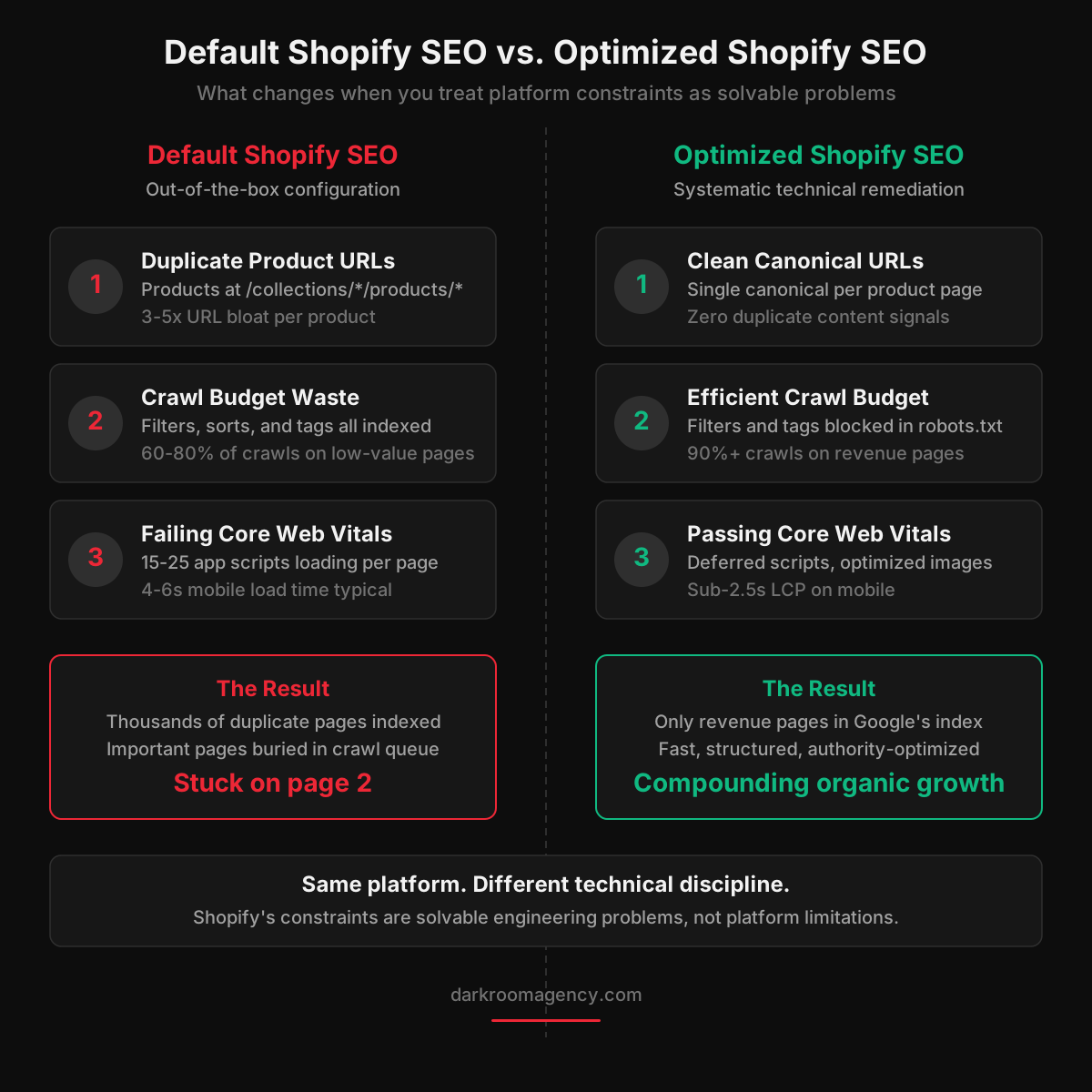
Start with the URL structure. Shopify forces every product into a /products/ prefix and every collection into /collections/. Products accessed through collections create secondary URLs. A product at /products/black-hoodie also exists at /collections/mens/products/black-hoodie and /collections/new-arrivals/products/black-hoodie. For a store with 200 products and 15 collections, that means thousands of duplicate pages competing for the same keywords.
Then there is collection filtering. When a shopper filters by size, color, or price, Shopify generates a unique URL with query parameters. These filtered pages get crawled and indexed by Google, creating hundreds of thin, near-duplicate pages that dilute crawl budget and confuse the search engine about which page should rank. Google's documentation on duplicate content makes clear that this pattern directly harms organic performance.
JavaScript is the third layer. The app ecosystem adds client-side scripts that balloon page weight. The average Shopify store runs 15-25 third-party apps, each injecting its own JavaScript. The result is pages that take 4-6 seconds to become interactive on mobile, well above the thresholds Google uses as ranking signals through Core Web Vitals.
None of this is unique to Shopify. But the combination of mandatory URL patterns, default duplicate content generation, and an app ecosystem that degrades performance creates a specific technical profile that requires a specific remediation approach. A category-level SEO strategy built for Shopify needs to address these structural issues before anything else will work.
Crawl Budget Optimization for Shopify
Google allocates a finite crawl budget to every domain. Shopify stores waste most of theirs on pages that should never be indexed.
Identifying the Waste
Crawl budget is the number of pages Googlebot will crawl on your site within a given time period. For most Shopify stores, the absolute budget is not the constraint. Crawl priority is. Every time Googlebot wastes a crawl on a filtered collection page or a duplicate product URL, it is not crawling the pages you actually want to rank.
Open Google Search Console and check the Pages report under Indexing. You will likely find hundreds of pages marked as "Discovered - currently not indexed" or "Crawled - currently not indexed." If your important product and collection pages are in this group, you have a crawl prioritization problem. Run a full site crawl using Screaming Frog or Sitebulb and sort by URL pattern to identify clusters of duplicate content.
The Technical Fixes
Shopify gives you control over robots.txt through the robots.txt.liquid template. Use this to block crawling of filtered collection URLs, sorted variations, and search result pages by disallowing /collections/*?* and /search?* paths.
For product URL canonicalization, edit your theme's product.liquid template to ensure every product page outputs a canonical tag pointing to the root /products/ URL, not the /collections/*/products/ variation. Shopify does this by default in most themes, but many customizations and app modifications break this behavior. Verify by viewing page source on a product accessed through a collection path.
For large collections spanning multiple pages, ensure each paginated page has proper self-referencing canonical tags and is included in your sitemap. Do not noindex paginated pages. They serve a legitimate crawling function that helps Google discover deeper products.
Shopify SEO Issue | Default Behavior | Technical Fix | Impact |
|---|---|---|---|
Duplicate product URLs | Products at /collections/*/products/* | Canonical tags pointing to /products/* root | High |
Collection filter indexing | Filtered URLs crawled and indexed | Block via robots.txt.liquid + noindex meta | High |
Pagination duplication | Paginated pages compete with page 1 | Self-referencing canonicals + rel tags | Medium |
Search page indexing | Internal search results get crawled | Disallow /search in robots.txt.liquid | Medium |
Tag page bloat | /collections/*/tag creates indexable pages | Noindex tag pages or redirect to parent | Medium |
Core Web Vitals Remediation on Shopify
Google uses Core Web Vitals as a ranking signal. Most Shopify stores fail on at least two of the three metrics, and the primary cause is third-party app scripts.
Core Web Vitals measure three things: Largest Contentful Paint (LCP), which tracks how quickly the main content loads; Cumulative Layout Shift (CLS), which measures visual stability; and Interaction to Next Paint (INP), which evaluates responsiveness. Google's Core Web Vitals documentation defines good scores as LCP under 2.5 seconds, CLS under 0.1, and INP under 200 milliseconds.
The typical Shopify store fails LCP because hero images are too large and render-blocking scripts delay paint. CLS fails because app-injected banners and dynamic content shift the layout after initial render. INP fails because heavy JavaScript from multiple apps blocks the main thread.
Practical Remediation
Audit every installed app and measure its script weight. Remove any app you are not actively using. For apps you keep, defer their JavaScript loading by adding the defer or async attribute to script tags in your theme. Test each change individually since some apps break when loaded asynchronously.
Optimize images aggressively. Use Shopify's built-in image transformation API to serve WebP format at appropriate sizes. Replace static hero images with responsive srcset implementations. Lazy-load every image below the fold. Preload your main CSS file, primary font files, and hero image using preload link tags in your theme head. For fonts, use font-display: swap to prevent invisible text during loading.
Minimize layout shift by reserving space for dynamic elements. If you use a notification bar, announcement banner, or cookie consent widget, set explicit height and width on their containers. This single fix can move CLS from failing to passing on many Shopify stores. These performance improvements also directly impact conversion rate optimization since every 100-millisecond improvement in load time increases conversion rate measurably.
Schema Markup Implementation for Shopify
Structured data is the bridge between your product catalog and how search engines and AI systems understand your offerings. Most Shopify themes implement the bare minimum.
Schema markup tells Google and AI engines exactly what your page contains. Without it, search engines infer this information from page content, often incorrectly. With it, you earn rich results that increase click-through rates and provide the structured information that generative engines use for citations.
The baseline schema for every Shopify product page should include Product schema with name, description, image, sku, brand, offers (including price, priceCurrency, availability, and url), and aggregateRating if you have reviews. Most themes output some of this but frequently omit the offers sub-schema or output incorrect availability values.
Collection pages should include CollectionPage schema with ItemList markup. Add FAQ schema to product pages with FAQ sections and to collection pages with educational content. Implement BreadcrumbList schema reflecting your collection hierarchy. Shopify's default breadcrumb implementation often outputs flat breadcrumbs that miss the actual collection-to-product hierarchy.
Validate all schema using Google's Rich Results Test. Run every template type through the validator. Invalid schema is worse than no schema because it signals to Google that your structured data is unreliable. According to Search Engine Journal's analysis of structured data impact, sites with complete and valid Product schema see 20-35% higher click-through rates from search results compared to those without it.
Internal Linking Architecture for Shopify Stores
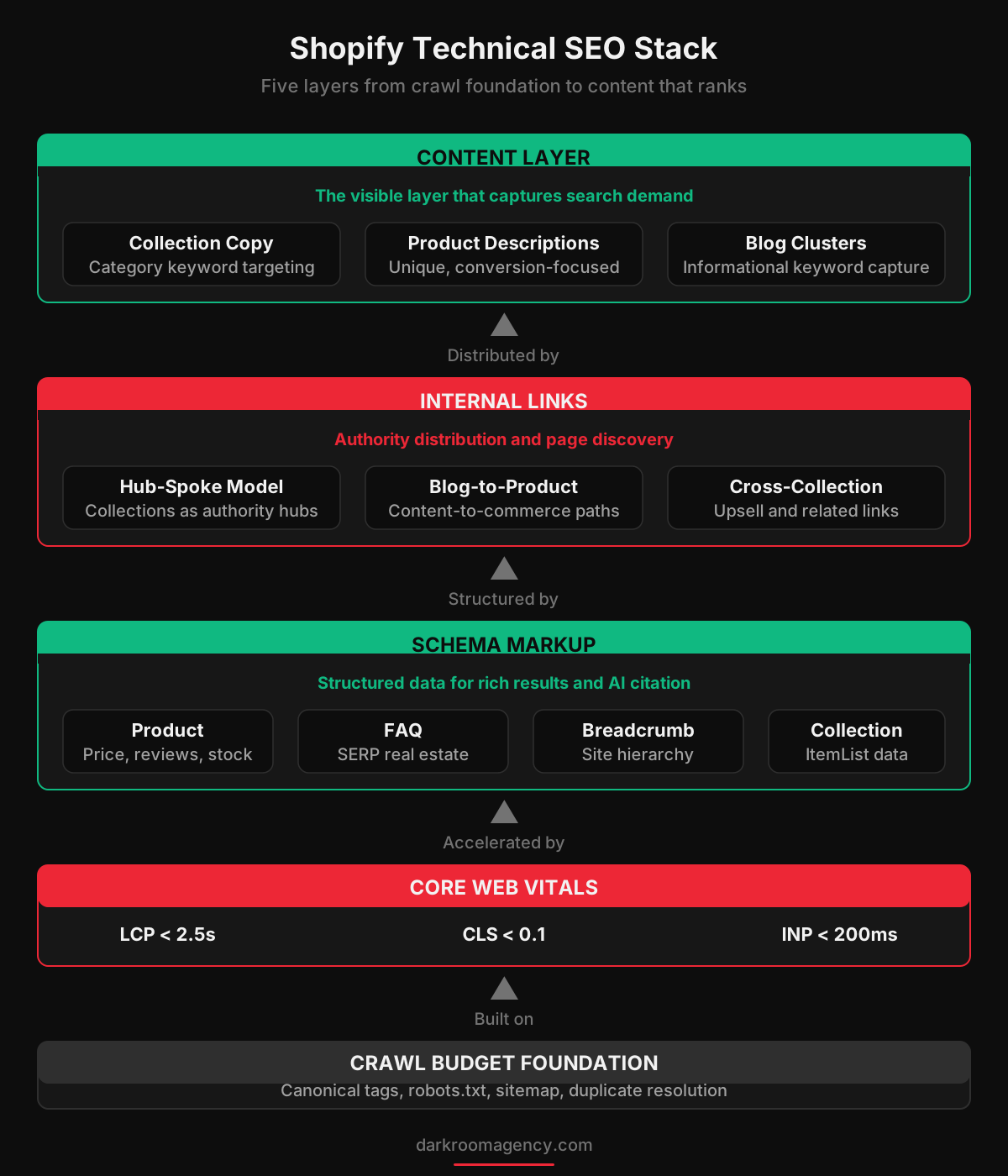
Internal linking is the most underutilized SEO lever on Shopify. The platform's default navigation creates a flat linking hierarchy that fails to distribute authority where it matters.
Internal links serve two functions. They help Google discover and prioritize pages based on how frequently they are linked. And they pass PageRank from high-authority pages to the pages you want to rank. A product page linked from your homepage, three collection pages, and five blog posts will outrank an identical page linked from only one collection.
Collection pages should be your primary SEO targets for category-level keywords. Link to your top collections from the main navigation, the homepage, and relevant blog content. Each collection page should link to its products, to related collections, and back to parent categories. This hub-and-spoke model ensures collection pages accumulate authority and distribute it to products.
Blog content is the internal linking engine most Shopify stores ignore. Every blog post should link to 2-3 relevant collection or product pages using descriptive anchor text. This creates conversion paths from educational content to purchase intent. The relationship between content and commerce is the foundation of a full-funnel marketing system that compounds over time.
The technical implementation matters. Use descriptive anchor text that includes target keywords, not generic "click here" phrases. Links in body content carry more weight than links in navigation or footers. Place your most important internal links in the first third of the page content.
Content Strategy Within Shopify's Constraints
Shopify's content tools are limited compared to WordPress, but the constraints are workable. The content itself matters more than the tooling.
Collection page content is the highest-value SEO content on a Shopify store. A collection page with 20 products and no descriptive text gives Google very little to work with. Add 300-500 words of unique content to every important collection page addressing what the products are, who they are for, and why this collection exists. Place a brief 2-3 sentence introduction above the product grid and a longer section below it.
Product descriptions need to go beyond manufacturer copy. Duplicate descriptions across retailers is a widespread problem that Google handles by choosing one canonical version, and that version usually is not yours. Write unique descriptions including target keywords, customer questions, and specific details about materials, sizing, and use cases.
Blog content should target informational keywords feeding into collection and product pages. Build topic clusters around your main categories. Each piece links to relevant product and collection pages. This integrated search strategy captures traffic at every stage of the buying journey.
For AI-optimized content, structure pages with clear, direct claims supported by specific data points. AI engines extract and cite content that makes definitive statements rather than vague descriptions. This is the AI-native content approach that earns citations in generative search results.
The 4-Step Shopify SEO Audit and Remediation Framework
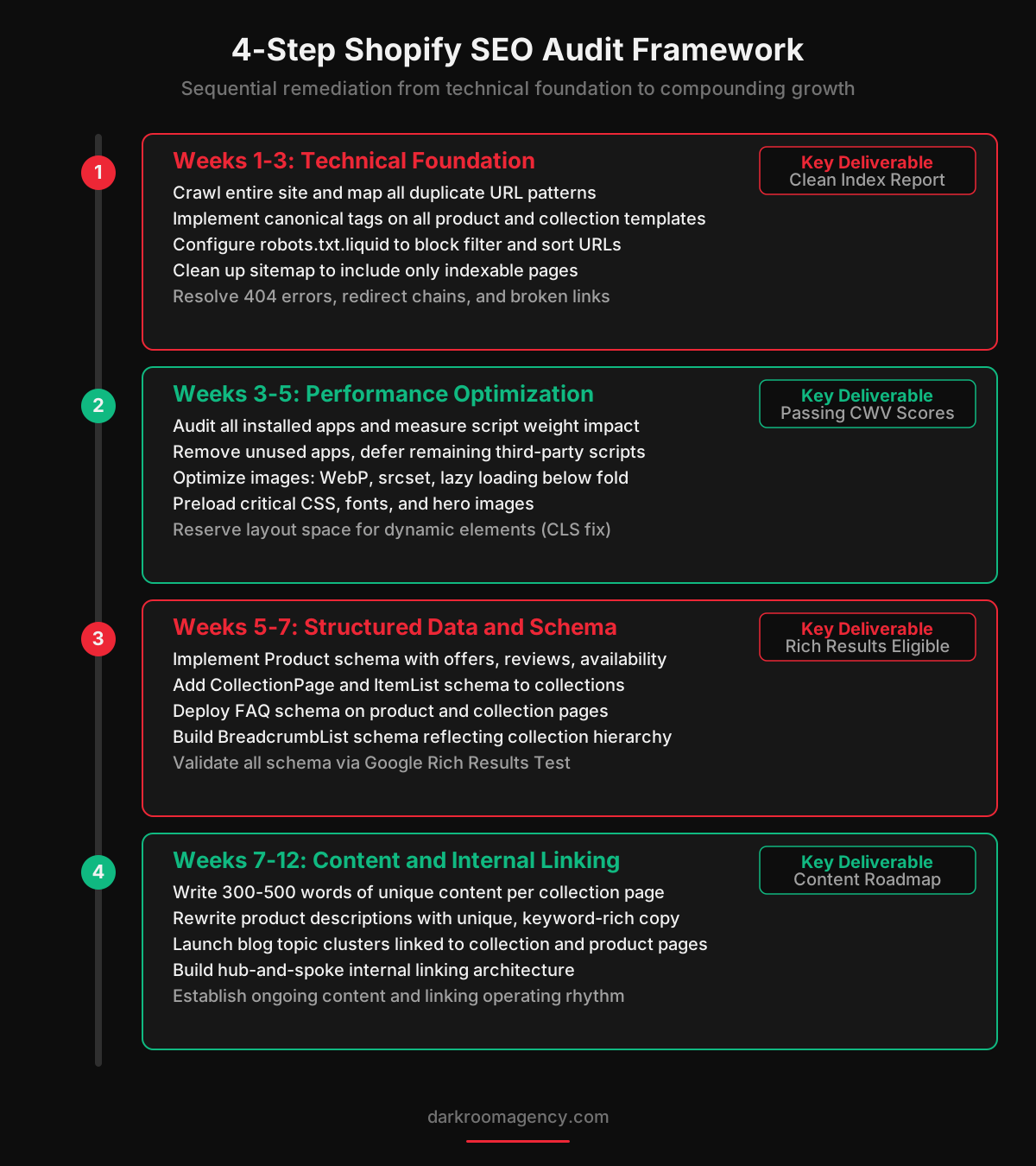
Fixing Shopify SEO is sequential work. Each layer builds on the previous one. Skipping steps wastes effort and delays results.
Step 1: Technical Foundation (Weeks 1-3). Crawl the entire site. Fix all duplicate content through canonical tags and robots.txt rules. Resolve 404 errors, redirect chains, and broken internal links. Clean up the sitemap to include only indexable pages. Verify Google Search Console shows clean indexing status.
Step 2: Performance Optimization (Weeks 3-5). Audit and remediate Core Web Vitals. Remove unused apps and scripts. Optimize images and implement lazy loading. Preload critical resources. Target passing scores on all three CWV metrics. This directly improves both rankings and conversion rates.
Step 3: Structured Data and Schema (Weeks 5-7). Implement comprehensive Product, CollectionPage, FAQ, BreadcrumbList, and Organization schema across all templates. Validate using Google's testing tools. Submit updated pages for reindexing. Monitor the Rich Results report for new eligible results.
Step 4: Content and Internal Linking (Weeks 7-12). Build collection page content, rewrite product descriptions, and launch blog topic clusters. Implement the hub-and-spoke internal linking architecture. The first three steps are one-time fixes. This step is a permanent operating rhythm that compounds month over month.
Audit Phase | Timeline | Key Deliverables | Metrics to Track |
|---|---|---|---|
Technical Foundation | Weeks 1-3 | Canonical audit, robots.txt, sitemap cleanup | Indexed pages, crawl errors, duplicate count |
Performance Optimization | Weeks 3-5 | App audit, image optimization, CWV fixes | LCP, CLS, INP scores across templates |
Structured Data | Weeks 5-7 | Product, Collection, FAQ, Breadcrumb schema | Rich result eligibility, validation errors |
Content and Linking | Weeks 7-12 | Collection copy, product rewrites, blog clusters | Organic traffic, rankings, link coverage |
Measuring Shopify SEO Performance
The metrics that matter for Shopify SEO are not the ones most dashboards show. Organic sessions alone is a vanity metric without revenue context.
Track four categories. First, indexing health: how many pages are indexed versus discovered, error counts, and month-over-month index trends from Google Search Console. If indexed pages decline while your catalog grows, you have a crawl budget or canonicalization problem.
Second, ranking distribution: keyword counts in positions 1-3, 4-10, 11-20, and 21-50. Movement between brackets matters more than individual positions. Stagnation in the 11-20 range usually indicates a domain authority or content depth problem. Brands investing in growth marketing across multiple channels tend to build the authority signals that push rankings over these plateaus.
Third, organic revenue broken down by landing page type. Your collection pages, product pages, and blog posts convert at different rates. Understanding which page types generate the most organic revenue tells you where to invest further.
Fourth, technical health scores: Core Web Vitals pass rates, schema validation status, and crawl efficiency ratio. These are leading indicators. If technical scores deteriorate, ranking and revenue metrics follow within 4-8 weeks.
A well-executed Shopify SEO program shows measurable improvement in technical health within the first month, ranking movement within 2-3 months, and organic revenue growth within 4-6 months. Any Shopify SEO agency promising faster results is likely conflating paid search with organic improvement.
Why a Shopify SEO Agency Approach Matters
The technical work in this playbook is straightforward to understand and demanding to execute consistently. That gap between understanding and execution is where most Shopify stores lose ground.
Shopify SEO requires ongoing attention because the platform updates regularly, Google's algorithms evolve, and your catalog changes with every product launch. A one-time audit produces a list of fixes. What produces compounding organic growth is a permanent operating discipline that treats technical SEO, content development, and performance monitoring as continuous work.
The decision between handling this internally or working with a Shopify SEO agency depends on whether your team has the technical depth for theme-level changes and schema, and whether you have editorial capacity for ongoing content and linking. Most DTC brands at the growth stage have neither. Their teams are focused on performance creative and CRO initiatives that drive immediate revenue, and organic search gets deprioritized until flattening traffic makes the technical debt visible.
The right partner brings a full-service perspective and treats Shopify's constraints as known engineering problems with documented solutions. They measure success in organic revenue growth, not keyword reports. And they coordinate SEO with your paid media, CRO, and email marketing programs so each channel amplifies the others. Treating performance creative and organic search as connected disciplines rather than isolated line items is what separates agencies that build durable growth from those that generate reports.
FAQ
Why does Shopify have SEO problems out of the box?
Shopify generates duplicate content through collection filtering, creates rigid URL structures with mandatory /collections/ and /products/ prefixes, outputs bloated JavaScript bundles, and mismanages canonical tags on variant and paginated pages. These defaults create technical debt that compounds as the catalog grows.
Can Shopify SEO apps fix these technical issues?
Most Shopify SEO apps address surface-level issues like meta titles and alt text. They cannot fix the underlying platform constraints around URL structure, JavaScript rendering, crawl budget waste, or internal linking architecture. The fix requires systematic technical work at the theme and configuration level.
How do I fix duplicate content on Shopify collection pages?
Implement self-referencing canonical tags on all collection pages. Use Shopify's robots.txt.liquid to block filtered and sorted variations from being crawled. Ensure product URLs resolve to a single canonical version rather than collection-dependent paths.
What Core Web Vitals issues are most common on Shopify?
High Largest Contentful Paint from unoptimized hero images and render-blocking scripts, poor Cumulative Layout Shift from dynamically loaded elements and app injections, and elevated Interaction to Next Paint from heavy JavaScript execution. Third-party app scripts are the primary offender.
How important is schema markup for Shopify SEO?
Schema markup is critical for earning rich results and AI engine citations. Product schema with price, availability, and review data directly improves click-through rates. FAQ schema captures additional SERP real estate. Most Shopify themes include minimal schema that misses these opportunities.
How long does it take to see results from Shopify technical SEO?
Crawl budget and indexing fixes show impact within 4-6 weeks. Core Web Vitals improvements affect rankings within 2-3 months. Schema and internal linking changes compound over 3-6 months as Google processes structural signals and surfaces rich results.
Should I migrate off Shopify for better SEO?
In most cases, no. Shopify's SEO limitations are solvable with systematic technical work. The platform's strengths in checkout conversion and operational reliability outweigh the SEO constraints. Migration introduces significant risk of traffic loss. Treat the constraints as engineering problems and solve them within the platform.
How does Shopify SEO connect to paid media and retention?
Organic search, paid media, and retention marketing reinforce each other. Paid search data informs organic keyword targeting. Organic content reduces paid media dependency. A retention marketing stack that drives repeat visits builds engagement signals Google uses as quality indicators. The strongest programs coordinate all channels.
Ready to fix your Shopify store's technical SEO and start building compounding organic growth? Book a call with Darkroom to get started.