
Retention Marketing
Email Deliverability in 2026: The Complete Guide for Ecommerce Senders




Written by Darkroom leardership
Jul 27, 2026

Email deliverability is the measure of whether your emails reach subscribers' inboxes instead of spam folders. It is distinct from delivery: an email that is delivered may still land in spam. Deliverability is determined by sender reputation, authentication (SPF, DKIM, DMARC), list quality, and engagement, and it directly controls how much revenue email can produce.
Deliverability is a P&L issue wearing a technical costume, and most brands discover it only after revenue drops. Email and SMS typically drive 25 to 35% of DTC revenue, and every dollar of it depends on inboxing; a list that stops reaching inboxes stops compounding customer lifetime value.
This guide covers the rules mailbox providers now enforce, the authentication records you need, and the operating discipline that keeps a sender healthy.
What is email deliverability?
Email deliverability is your ability to land in the inbox, not just to get accepted by the receiving server. The distinction matters because the two are measured separately and fail separately.
Delivery means the mailbox provider accepted the message (it did not bounce). Deliverability means the accepted message reached the inbox rather than the spam folder. A campaign can report 99% delivery while half the sends rot in spam, which is why open-rate cliffs often surprise teams whose dashboards look healthy.
Three metrics define it in practice: delivery rate (accepted/sent), inbox placement rate (inboxed/delivered, measurable only through seed or panel testing), and spam complaint rate (complaints/delivered). Providers judge you on the trend of all three.
Here is the trap: your ESP dashboard cannot see inbox placement. Klaviyo, Attentive, and every other ESP only know whether the receiving server accepted the message, not which folder it landed in. That blind spot is why deliverability problems typically surface as a mysterious open-rate decline weeks after the damage started.
Why deliverability is a revenue metric, not an IT metric
A deliverability problem is a revenue problem with a delay timer, because owned channels carry 25 to 35% of revenue at healthy DTC brands (a first-party range from Darkroom's client P&L reviews). When inbox placement slips, every flow and campaign in your email revenue architecture degrades at once, silently.
The math makes it concrete. A brand doing $20M in revenue, with 30% from owned-channel revenue, earns $6M a year from email and SMS. If inbox placement drops 10 points, roughly $600K of annual revenue is exposed, and no amount of better subject lines wins it back while the mail sits in spam.
Deliverability also decides the email vs SMS balance. SMS does not have a spam folder problem, but it costs 10 to 30× more per message, so every point of email inbox placement you lose gets replaced with a far more expensive channel. Protecting deliverability is the cheapest retention investment available.
Why are my emails going to spam? The 5 causes ranked
Emails go to spam for five reasons, and they compound: weak sender reputation, missing authentication, low engagement, spam-pattern content, and infrastructure mistakes. Ranked by how often we see each one actually driving the problem:
Sender reputation damage. The provider's memory of your domain and IP can fetch complaint history, spam-trap hits, bounce rates, volume spikes, and much more. Reputation explains most sudden "we changed nothing" spam-folder slides.
Missing or failing authentication. Unauthenticated mail is now rejected or junked by policy at every major provider, regardless of content quality.
Low engagement. Providers watch opens, replies, and deletes-without-reading at the mailbox level. Sending to people who ignore you teaches the algorithm to hide you.
Content patterns. Link shorteners, image-only emails, mismatched from-domains, and spam-trigger formatting. Content matters far less than reputation, but it can tip borderline mail.
Infrastructure mistakes. Missing PTR records, no TLS, shared IPs with bad neighbors, or cold IPs sent at full volume with no warming period.
Notice what is not on the list: "spam words" in subject lines. Modern filtering is behavioral. Fixing the word "free" while your complaint rate sits at 0.4% is rearranging deck chairs.
Gmail, Yahoo, and Outlook bulk-sender requirements for email deliverability
Since February 2024, Gmail and Yahoo enforce hard requirements on anyone sending 5,000+ messages per day: authenticate with SPF, DKIM, and DMARC, keep spam complaints under 0.3%, and support one-click unsubscribe. The rules live in Google's Email Sender Guidelines and the Yahoo Sender Hub, and per Google's sender guidelines FAQ, enforcement escalated in November 2025 from error codes to temporary and permanent rejections of non-compliant traffic.
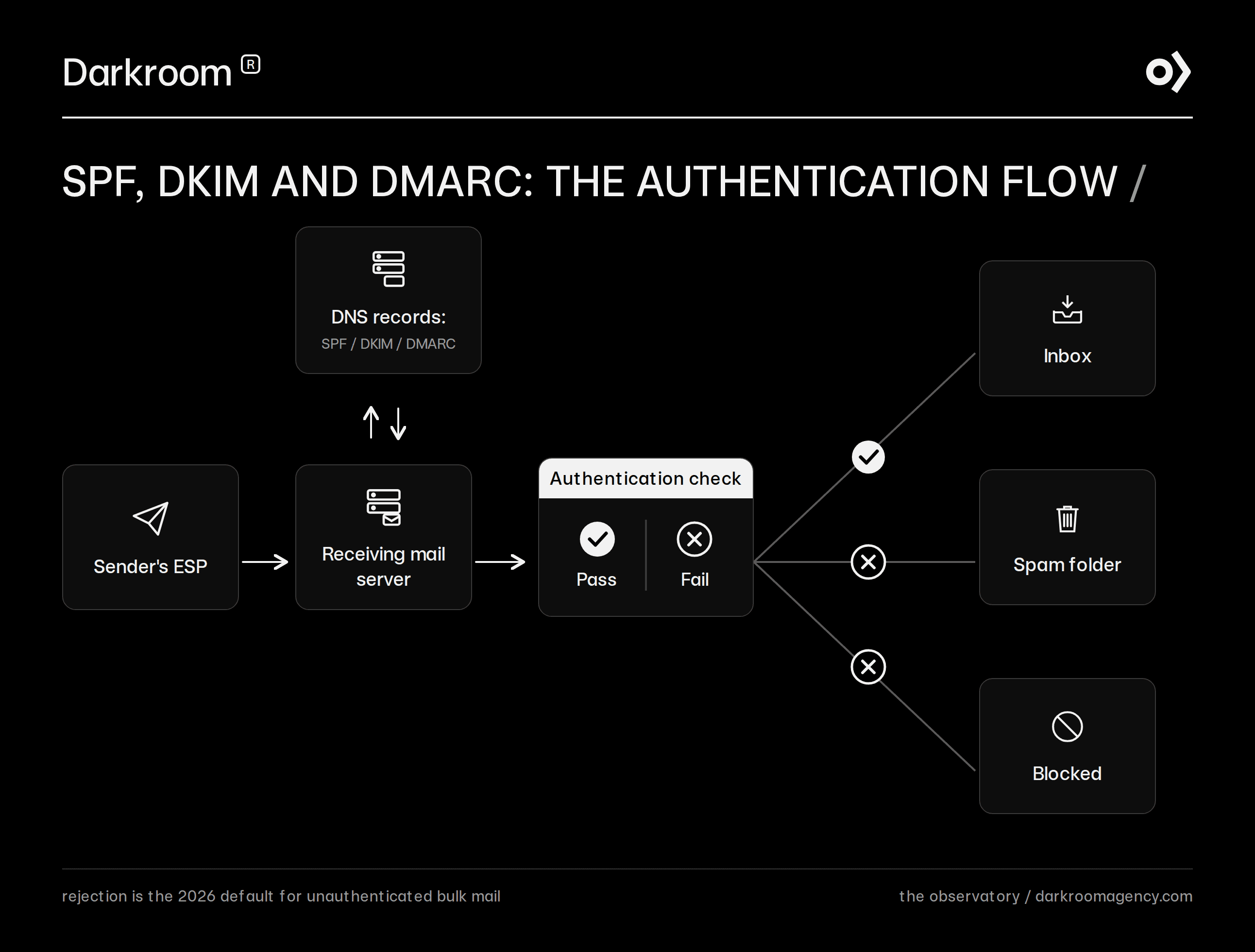
The 2026 reality adds a third enforcer: Microsoft. As of May 5, 2025, Outlook rejects mail outright from 5,000+/day senders that fail SPF, DKIM, or DMARC, returning error 550 5.7.515 instead of routing to junk. All three major mailbox ecosystems now enforce the same baseline, so treat it as the cost of sending, not a Gmail quirk.
Practically every DTC brand crosses the 5,000/day line: one campaign to a 6,000-person segment qualifies. Assume the rules apply to you.
Authentication: SPF, DKIM, and DMARC are mandatory
All three protocols are required for bulk senders, and the From domain must align with the authenticated domain. Google requires all senders (any volume) to have SPF or DKIM, valid PTR records, and TLS; at 5,000+/day, SPF and DKIM and a DMARC policy become mandatory. The next section explains each record and shows what to publish.
Alignment is the detail teams miss. It means the domain in the From address your subscribers see must match the domain that passed SPF or DKIM. Mail signed only with your ESP's shared domain authenticates technically but fails alignment, which is why "we already have DKIM" and "we are compliant" are not the same statement.
Yahoo's requirements mirror Google's almost exactly: authentication for bulk senders, complaint rates below 0.3%, and one-click unsubscribe honored within two days. In practice, satisfying Google's guidelines satisfies Yahoo's, which is why the two announced the rules together.
The 0.3% spam-complaint threshold
Google's enforcement threshold is a 0.3% spam complaint rate, with 0.1% as the stated target. Below 0.1% you are safe; between 0.1% and 0.3% deliverability quietly degrades; sustained time above 0.3% triggers bulk spam-foldering that takes weeks to recover from, even after the rate drops.
Track it in Google Postmaster Tools, which reports your complaint rate, domain reputation, and authentication pass rates directly from Gmail's data. It is free, and for Gmail (usually 40 to 60% of a US DTC list), it is the closest thing to ground truth that exists.
One-click unsubscribe (RFC 8058)
Bulk senders must support one-click unsubscribe: a header-level opt-out the mailbox provider renders as its own button, processed within two days. It is defined in RFC 8058 and requires two headers:
List-Unsubscribe: <https://yourbrand.com/unsubscribe/one-click?u=12345&c=abc>
List-Unsubscribe-Post: List-Unsubscribe=One-Click
The counterintuitive part: easy unsubscribes protect revenue. Every subscriber who cannot find the exit clicks "report spam" instead, and one complaint hurts your sender reputation more than fifty unsubscribes. Major ESPs (email service providers) add these headers automatically; your job is to verify they are on and that the endpoint actually processes the request.
Email authentication explained: SPF, DKIM, DMARC
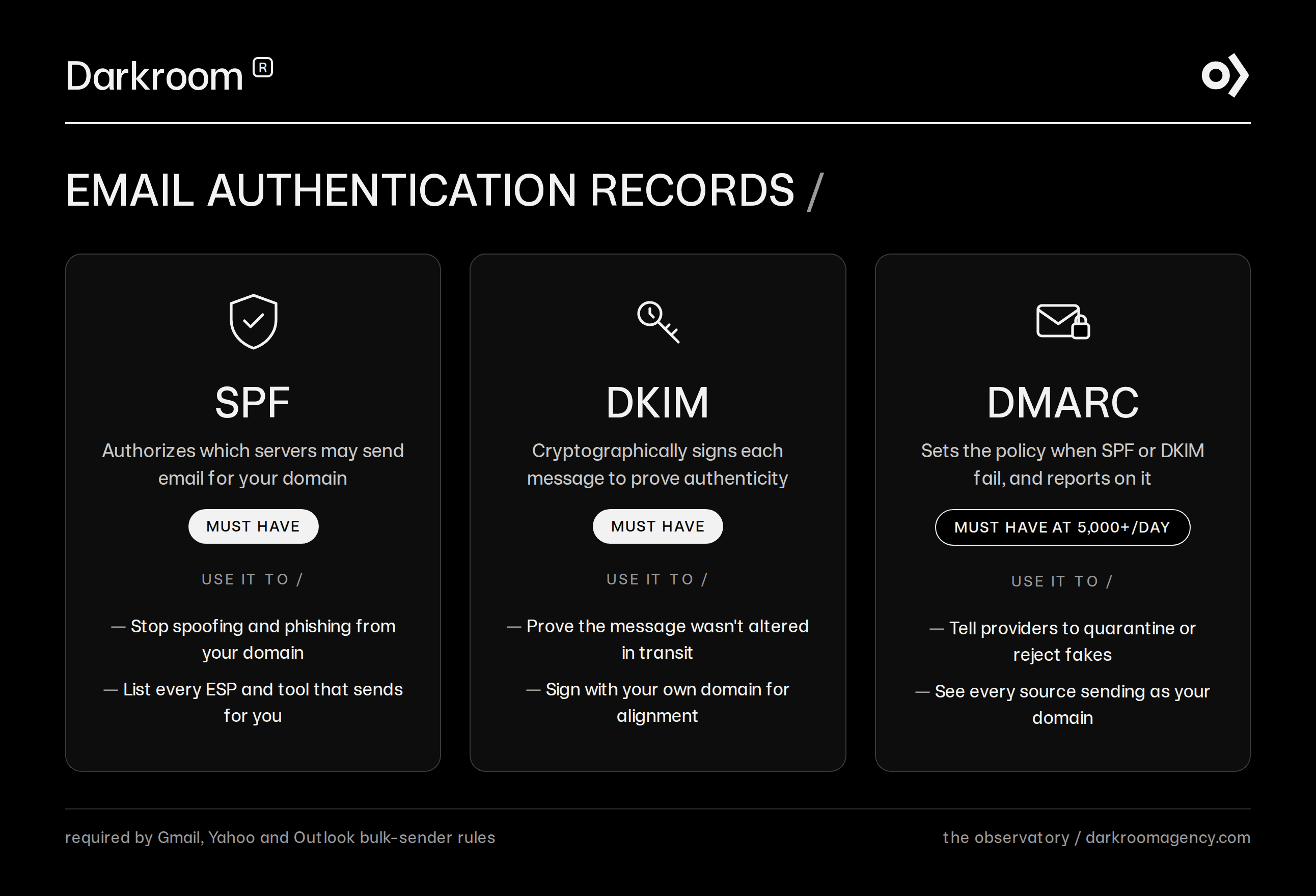
SPF, DKIM, and DMARC are three DNS records that together prove your mail is really from you: SPF says who may send, DKIM proves the message was not altered, and DMARC tells providers what to do when checks fail. Each is a 10-minute DNS change; here is what each one does and looks like.
SPF: who may send for your domain
SPF (Sender Policy Framework) is a DNS TXT record listing every server authorized to send email for your domain. Receiving servers check the sending IP against the list.
v=spf1 include:_spf.google.com include:sendgrid.net ~all
Read it as: Google Workspace and SendGrid may send for us; treat anything else as suspicious (~all). Two rules: keep every ESP and tool that sends on your behalf in the record, and never exceed 10 DNS lookups, which silently breaks SPF.
DKIM: proving the message wasn't altered
DKIM (DomainKeys Identified Mail) adds a cryptographic signature to every message, with the public key published in DNS. If the content is modified in transit, or the sender never had the private key, the signature fails.
selector1._domainkey.yourbrand.com TXT
"v=DKIM1; k=rsa; p=MIGfMA0GCSqGSIb3DQEBAQUAA4GN..."
Your ESP generates the key pair and gives you the record to publish. Use a 2048-bit key, and sign with your own domain rather than the ESP's shared domain, or DMARC alignment fails.
DMARC: policy plus reporting
DMARC (Domain-based Message Authentication, Reporting and Conformance) is the enforcement layer: it tells providers what to do with mail that fails SPF or DKIM alignment, and it sends you reports on who is sending as your domain.
_dmarc.yourbrand.com TXT
"v=DMARC1; p=quarantine; rua=mailto:dmarc-reports@yourbrand.com; pct=100"
Roll the policy out in stages: start at p=none (monitor only, satisfies the bulk-sender minimum), read the reports for 4 to 6 weeks to catch legitimate senders you forgot, move to p=quarantine (failures go to spam), and finish at p=reject once reports run clean. Jumping straight to reject is how brands accidentally block their own receipts and support mail.
List hygiene: the discipline that protects sender reputation
Email list hygiene means sending only to people who demonstrably want your mail, and it is the single strongest ongoing driver of sender reputation. Authentication gets you judged fairly, but hygiene determines the verdict.
Three practices do most of the work:
Sunset policy. Automatically stop campaigns to subscribers with no opens or clicks in 90 to 180 days (calibrate to your purchase cycle). Unengaged addresses drag mailbox-level engagement scores and hide spam traps.
Re-permission before removal. Send lapsing segments a short "still want these?" drip campaign; the silent majority gets suppressed, not deleted, so you can win them back through other channels.
Bounce handling. Hard bounces suppressed immediately and automatically; soft bounces suppressed after 3 to 5 consecutive failures. A bounce rate above 2% marks a stale list to every provider watching.
The uncomfortable trade: your sendable list shrinks. Revenue per send rises, and total email revenue usually follows within a quarter, because the mail that still goes out actually inboxes.
How to test and monitor email deliverability?
Run an email deliverability test before every major send and monitor reputation weekly: Postmaster Tools for Gmail ground truth, seed testing for inbox placement, and your ESP dashboard for bounces and complaints. Monitoring is cheap; discovering a spam-folder problem through a revenue report is not.
The toolkit, in priority order: Google Postmaster Tools (free, Gmail reputation and complaint rates), a seed-testing service such as GlockApps or Inbox Monster (sends to a panel of real mailboxes and reports inbox vs spam placement by provider), and your ESP's bounce and complaint reporting. Wire the thresholds below into alerts in your retention marketing stack so you catch pages drifting someone before it compounds.
Metric | Healthy | Investigate | Emergency |
|---|---|---|---|
Spam complaint rate | <0.1% | 0.1 to 0.3% | >0.3% |
Hard bounce rate | <1% | 1 to 2% | >2% |
Unsubscribe rate | <0.3% | 0.3 to 0.5% | >0.5% |
Inbox placement (seed test) | >90% | 80 to 90% | <80% |
DMARC pass rate | >98% | 95 to 98% | <95% |
Thresholds for complaint rate come from Google's published limits; the bounce, unsubscribe, inbox placement, and DMARC rows are Darkroom first-party thresholds from client program management. Compare your trend against your own baseline, not just the absolute number. Full channel context lives in our email marketing benchmarks.
How to check your email sender reputation
Email sender reputation is checked in three places: Postmaster Tools domain reputation (High / Medium / Low / Bad, straight from Gmail), Microsoft SNDS for Outlook IP data, and third-party lookups like Talos or Sender Score for a directional signal. Check weekly and after any volume spike.
If reputation has already cratered: cut volume to your most engaged 20 to 30% of subscribers, fix the complaint source, and rebuild volume gradually over 2 to 4 weeks (a first-party repair window from Darkroom client work; severity varies). That is the same warming logic used for new domains, applied as repair.
The same discipline applies to anything new. A new sending domain, a new dedicated IP, or an ESP migration all start with zero reputation, so warm them: begin with your most engaged segment at low volume and roughly double every few days while complaint and bounce rates hold healthy. Brands that blast a full list from a cold setup on day one manufacture the exact spam-folder problem this guide exists to fix.
The pre-send email deliverability checklist
These 14 checks are the email deliverability best practices that prevent 90% of inboxing incidents, split into one-time setup and every-send discipline. Run the setup block once a quarter and the send block before every major campaign.
Setup (quarterly):
SPF record valid, all active senders included, under 10 DNS lookups
DKIM signing with your own domain, 2048-bit key
DMARC published and on the rollout path toward
p=rejectPTR records and TLS confirmed for all sending IPs
One-click unsubscribe headers present and the endpoint processes within 48 hours
Postmaster Tools and seed testing connected and alerting
Every send:
Segment excludes unengaged subscribers per your sunset policy
No purchased, rented, or scraped addresses anywhere in the audience
Complaint rate trend under 0.1% on the last five sends
Hard bounce rate under 1% on the last five sends
From-domain matches the authenticated domain (alignment)
Seed test passed at 90%+ inbox placement for top providers
Volume within 2× of your trailing 30-day daily average (no cold spikes)
Suppression list synced across ESP, SMS, and support tooling
How deliverability protects retention revenue
Deliverability is the floor under every retention number you report: flows, campaigns, win-backs, and loyalty mail all produce zero revenue in a spam folder. That is why Darkroom, the retention marketing agency, treats inbox placement as the first audit item in any retention program, before creative, offers, or cadence.
The modern edge is predictive. AI strategies for email like send-time optimization and engagement-scored segmentation concentrate volume on subscribers most likely to open, which raises the exact signals providers reward. Engagement segmentation is a deliverability strategy wearing a marketing hat.
The proof shows up in revenue: when we rebuilt Drip Hydration's full-funnel email and SMS strategy on segmented, engagement-first sending, revenue grew 50% in a year. None of that lift happens if the mail does not inbox first.
If your flows are built but open rates and Klaviyo revenue keep sliding, the problem is usually upstream of creative. Darkroom's retention marketing program starts with a deliverability and lifecycle diagnostic across your authentication, reputation, and segmentation, then turns it into a ranked revenue roadmap. Book a call.