
AMAZON AND RETAIL MEDIA
Amazon Brand Registry: What It Actually Unlocks and How to Use It




Written by Darkroom leardership

Written & peer reviewed by 4 Darkroom team members
TL;DR: Amazon Brand Registry is positioned as an IP protection tool, but that framing undersells it by a wide margin. Enrollment is the prerequisite for A+ Content, Sponsored Brands, Amazon Stores, Brand Analytics, and the ability to control your own product detail pages. Without it, you're competing on price with no narrative leverage. The problem is that most brands enroll and then stop at A+ Content, leaving Sponsored Brands, Store optimization, and Brand Analytics untouched. That means they've unlocked the toolbox but only picked up one wrench. This playbook walks through enrollment, the full feature stack, and the 90-day operational sequence that separates brands using Brand Registry from brands merely enrolled in it. At Darkroom, we build Amazon growth systems that activate every Brand Registry feature from day one, because partial enrollment means partial results.
Why Brand Registry Matters More Than You Think
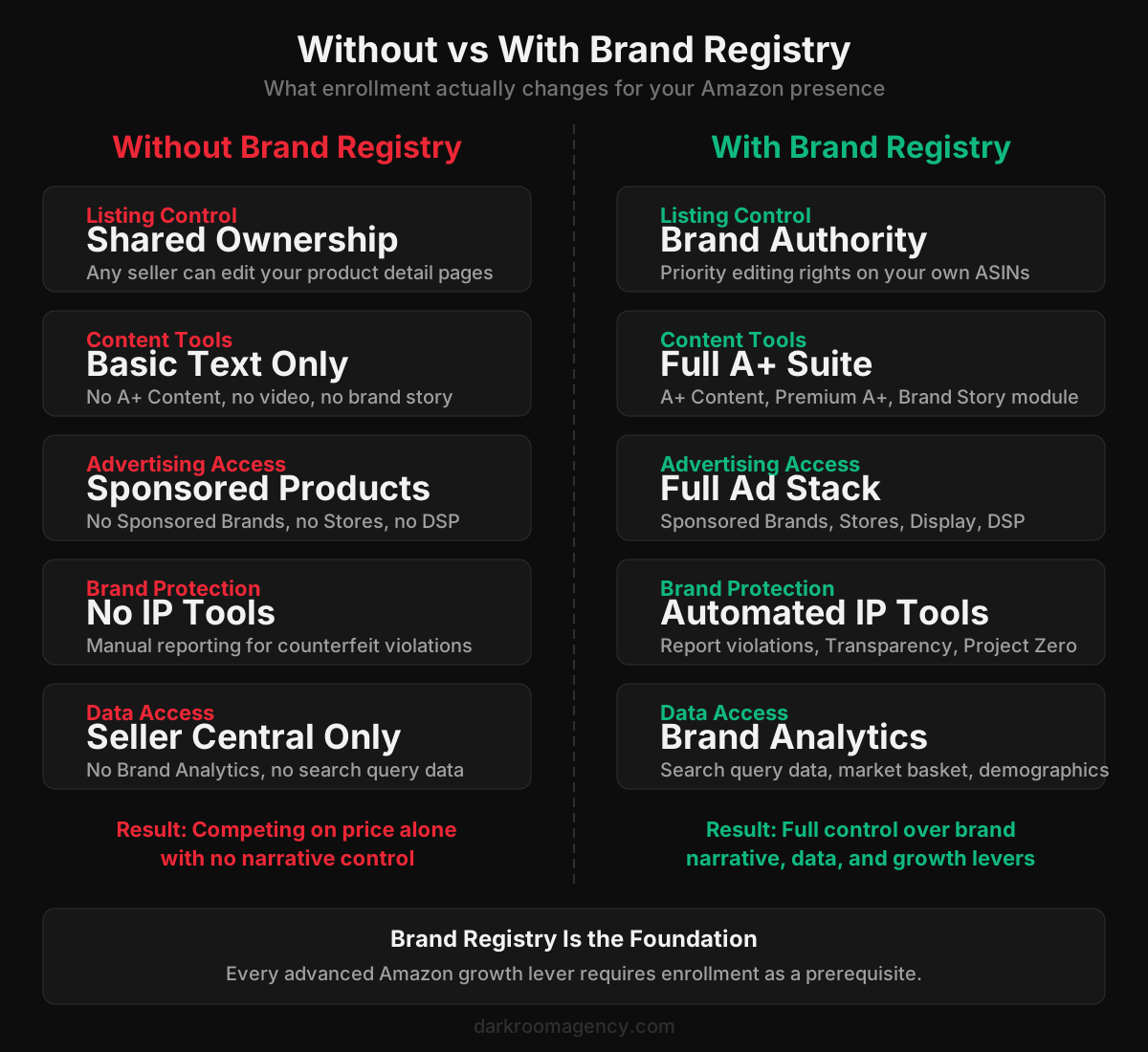
A brand selling on Amazon without Brand Registry is renting shelf space it can't control. Any third-party seller can edit your product title, swap your bullet points, or upload images that misrepresent your product. The detail page belongs to Amazon, not to you, and without enrollment the platform treats every seller's input as equally valid. For a deeper analysis, read our guide on Amazon marketing agencies that treat Amazon as a brand channel.
That changes the moment you enroll. Brand Registry grants priority editing rights on your ASINs, meaning your content takes precedence when there's a conflict. But listing authority is just the starting point. The real value is the six layers of capability that sit on top of enrollment: A+ Content, Sponsored Brands advertising, Amazon Stores, Brand Analytics, IP enforcement tools, and Premium A+ eligibility. This concept is explored further in our breakdown of what Amazon DSP does and when to use it.
According to Amazon's Brand Registry documentation, over 700,000 brands have enrolled globally. Yet internal estimates suggest fewer than 40% of those brands actively use more than two of the available feature sets. The enrollment rate is high. The activation rate is not.
That gap is where margin hides. Brands that activate the full stack see compounding returns because each layer reinforces the others. A+ Content lifts conversion rate. Sponsored Brands drives branded traffic to your Store. Brand Analytics reveals which search terms are converting. And IP tools protect the investment you've made in all of it. Remove any layer and the system underperforms. Our research on Amazon PPC management costs in 2026 provides additional context for this approach.
Feature | Without Brand Registry | With Brand Registry | Impact Level |
|---|---|---|---|
A+ Content (EBC) | Not available | Full access to enhanced detail pages | High |
Brand Store | Not available | Custom multi-page storefront | High |
Sponsored Brands Ads | Not available | Headline search ads and video ads | High |
Brand Analytics | Not available | Search terms, demographics, market basket | Critical |
IP Protection Tools | Standard reporting only | Automated protections and Report a Violation | Critical |
Virtual Bundles | Not available | Create bundles without physical packaging | Medium |
Manage Your Experiments | Not available | A/B test titles, images, and A+ content | High |
Enrollment Requirements and the Trademark Question
Brand Registry requires an active trademark registered on the principal register of a qualifying intellectual property office. In the US, that means the USPTO. The trademark must be text-based or image-based, and it must be in an active, registered status. Pending applications don't qualify unless you go through Amazon's IP Accelerator program, which pairs you with a vetted law firm to file the trademark on an expedited basis.
The application itself takes 15 to 30 minutes. You'll need your trademark registration number, a list of product categories, and images showing the brand name on your product or packaging. Amazon then sends a verification code to the trademark correspondent listed on the registration. This is where most delays happen. If the correspondent email on file with the USPTO is outdated, you'll need to update it before Amazon can verify you.
Once verified, approval typically takes 2 to 14 days. Some brands get approved within 48 hours. Others wait two weeks, particularly during Q4 when application volume spikes.
One thing that surprises brands: you don't need a US trademark to enroll for the US marketplace. Amazon accepts trademarks from the EU, UK, Japan, Australia, India, and several other jurisdictions. If you have an EUIPO registration and sell on amazon.com, you can enroll.
Brands that don't yet have a trademark but want access to Brand Registry features should evaluate Amazon's IP Accelerator. The program provides provisional Brand Registry access while your trademark application is still pending, which can save 6 to 12 months of waiting. The tradeoff is that you must use one of Amazon's approved law firms, and fees typically run $600 to $2,500 depending on complexity.
The Full Feature Set Most Brands Ignore
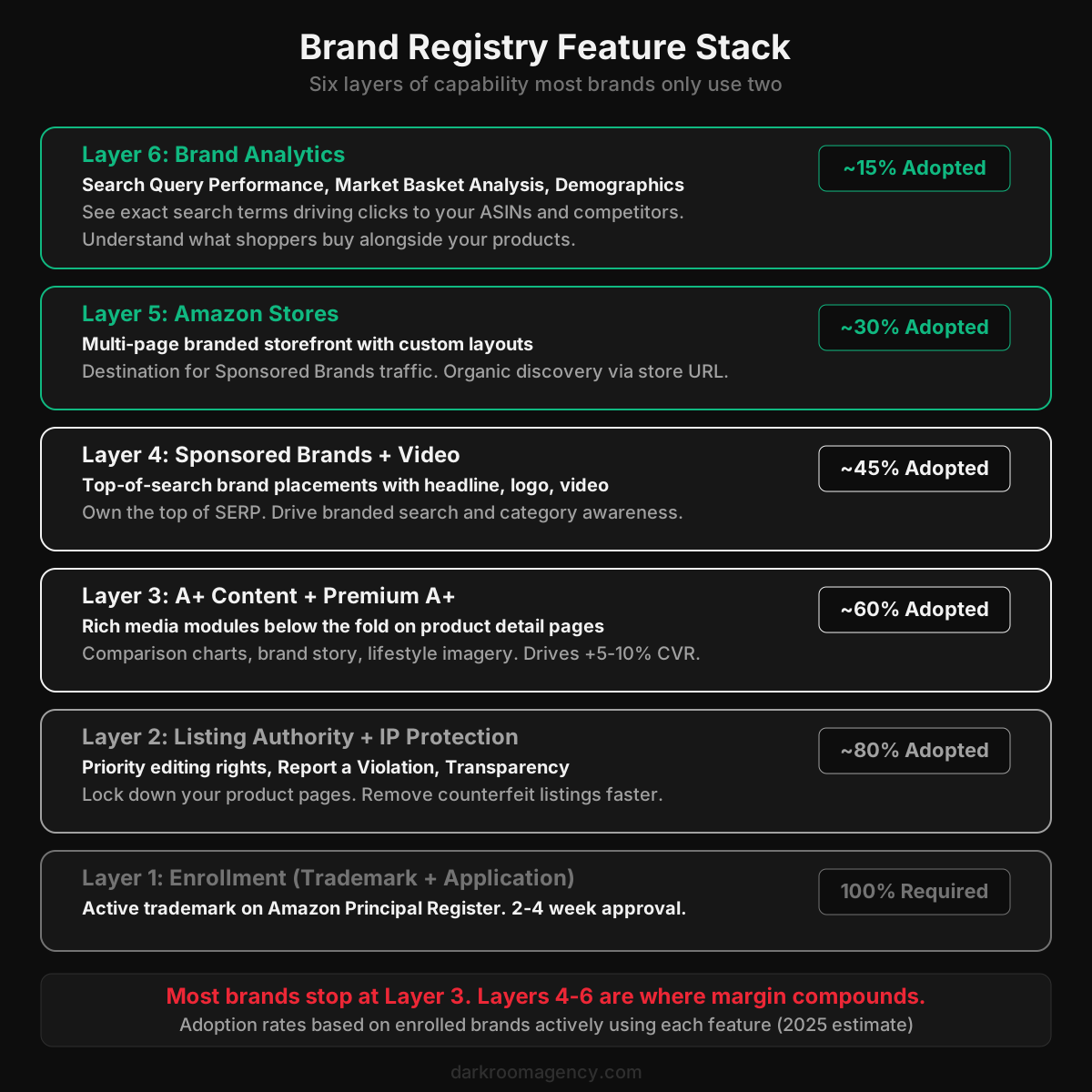
Enrollment opens six distinct capability layers. Most brands activate layers one and two, dabble with layer three, and ignore the rest. Here's what each layer actually does.
Listing authority and IP protection. This is what brands think Brand Registry is for. You get priority over other sellers when editing your product detail pages. You also get access to the Report a Violation tool, which lets you flag counterfeit listings, trademark misuse, and copyright infringement directly from your dashboard. Amazon's Transparency program lets you apply unique codes to every unit, making it impossible for counterfeiters to sell under your ASIN. Project Zero goes further, giving you the ability to remove counterfeit listings yourself without filing a report.
A+ Content and Premium A+. Standard A+ Content replaces the basic product description with rich media modules: comparison charts, lifestyle images, brand story blocks, and text overlays. Jungle Scout's Brand Registry guide cites conversion rate improvements of 5 to 10% from well-built A+ pages. Premium A+ unlocks video modules, interactive hotspot images, and carousel content. Qualification for Premium A+ requires a published Brand Story on at least 15 ASINs and active A+ Content on all your catalog, but the conversion lift from video alone often justifies the effort.
Sponsored Brands and Sponsored Brands Video. These ad formats are unavailable without Brand Registry. Sponsored Brands appear at the top of search results with your logo, a custom headline, and up to three products. Sponsored Brands Video plays an auto-looping video in the search results, which dramatically outperforms static placements on click-through rate. Both formats drive traffic to your Amazon Store rather than a single product page, which changes the economics of your Amazon marketing funnel entirely.
Amazon Stores. Your Store is a multi-page branded destination within Amazon. Think of it as a microsite: you control the layout, the imagery, the navigation, and the product assortment. Stores serve as the landing page for Sponsored Brands campaigns, but they also generate organic traffic through the store URL and Amazon's Posts feature. The brands that treat Stores as a real merchandising surface (not a dumping ground for their entire catalog) see measurably higher average order value from Store visitors versus product page visitors.
Brand Analytics. This is the most underused feature in Brand Registry. Brand Analytics gives you access to Amazon Search Query Performance data, which shows the exact search terms shoppers use before clicking on your products or your competitors' products. You also get Market Basket Analysis (what people buy alongside your product), Item Comparison and Alternate Purchase behavior (which products shoppers viewed instead of yours), and Demographics data. This is first-party Amazon data. No third-party tool replicates it with the same accuracy. And most enrolled brands never open the dashboard.
Darkroom's Amazon marketing agency team treats Brand Analytics as the starting point for every keyword, advertising, and content decision. The data tells you which search terms are converting, which competitors are stealing your clicks, and where your content is failing to close the sale. Running Amazon ads without this data is like bidding on keywords blindfolded.
Requirement | Details | Common Blocker |
|---|---|---|
Active Registered Trademark | Text-based or image-based mark registered with a government trademark office | Pending applications are accepted but limit access to some tools |
Trademark Registration Number | Must match the trademark office's database exactly | Typos or using serial number instead of registration number |
Product Categories | List of categories where the brand manufactures or sells products | Selecting categories not matching current Amazon listings |
Country of Manufacture | Where products bearing the trademark are produced | Inconsistency with product listing origin details |
Product Images | Photos showing the brand name permanently affixed to products or packaging | Digital mockups or labels that appear removable |
Verification Code | Amazon sends a code to the trademark office contact for identity verification | Outdated contact info at the trademark office |
What Changes Operationally After Enrollment
Enrollment alone doesn't change anything. Activation does. And activation requires a deliberate operational shift across three functions: content, advertising, and analytics.
1. Content becomes editorial, not logistical. Before Brand Registry, product listings are text documents. After enrollment, they become conversion assets. A+ Content lets you tell a visual story below the fold. Brand Story modules create cross-selling opportunities across your catalog. Premium A+ adds video, interactive elements, and carousel modules that transform a product page into something closer to a DTC landing page. The operational shift is that someone on your team (or your agency) now needs to produce and manage this content on a regular cadence.
2. Advertising shifts from keyword harvesting to brand building. Without Sponsored Brands, your entire ad strategy is Sponsored Products: bidding on keywords to show individual product placements. That's important, but it's only half the picture. Sponsored Brands lets you own the top of search with a headline and logo, driving shoppers to your Store where you control the full experience. Sponsored Brands Video stops the scroll in a way static ads never will. The operational shift is that your ad strategy now has an upper-funnel component. You need creative assets, a creative strategy for video, and a Store that actually converts the traffic you send to it.
3. Analytics becomes a competitive weapon. Brand Analytics data should inform every decision you make on Amazon. Search Query Performance tells you which terms to bid on and which to build content around. Market Basket Analysis tells you which products to bundle or cross-promote. Alternate Purchase data tells you which competitors are winning the clicks you're losing. The operational shift is that someone needs to pull, analyze, and act on this data weekly. Not monthly. Weekly. Because the competitive landscape on Amazon moves fast, and the brands using this data in real time will outmaneuver those reviewing it quarterly.
The 90-Day Activation Playbook
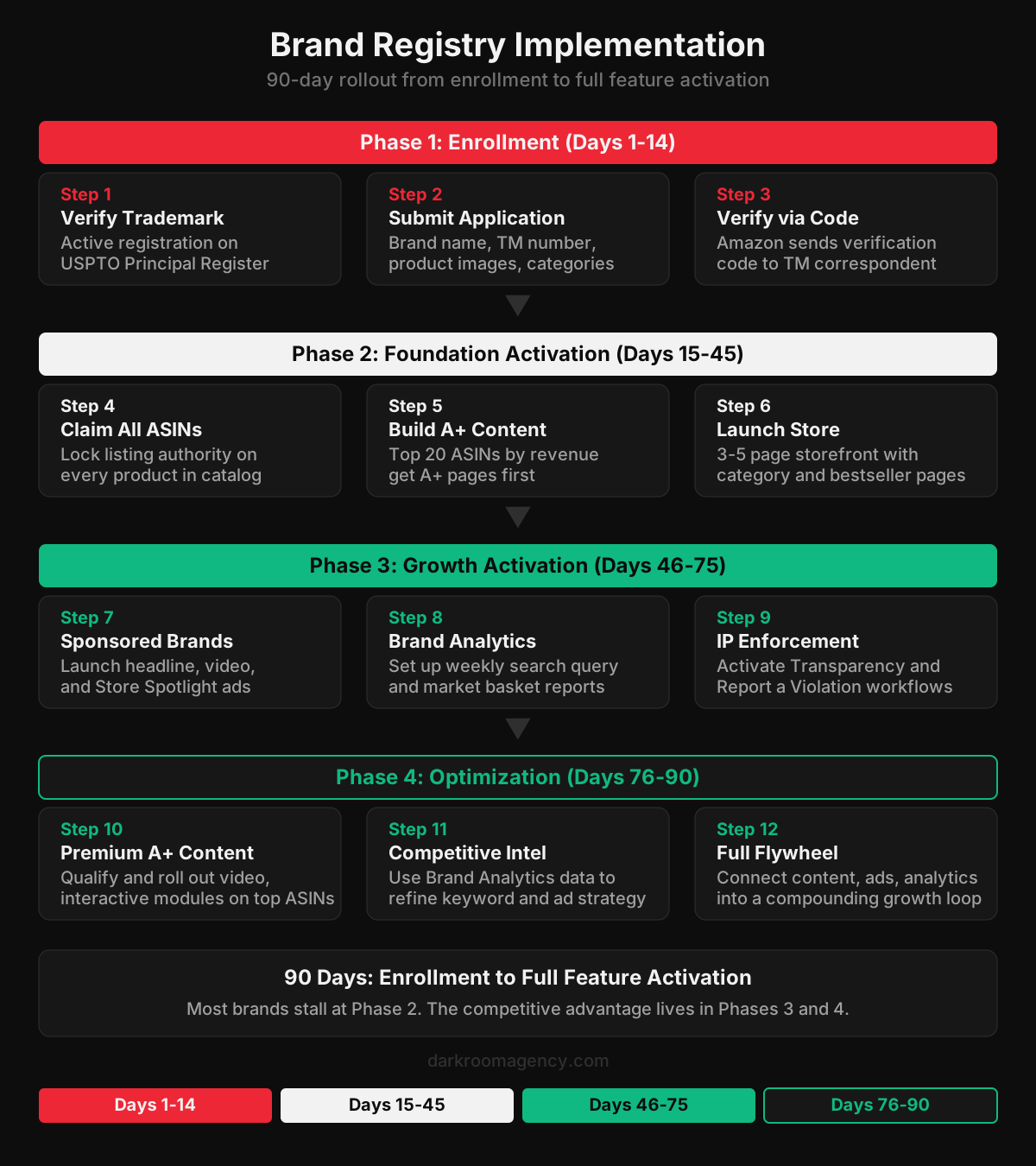
The biggest mistake brands make after enrolling in Brand Registry is treating activation as a project instead of a sequence. You can't launch Sponsored Brands before you have a Store to send traffic to. You can't optimize your Store before you have A+ Content on the products inside it. And you can't make smart keyword decisions before you've pulled your first Brand Analytics report. The sequence matters. See our analysis of Amazon vs retail media networks in 2026 for the complete framework.
Days 1 through 14: Enrollment and claiming. Submit your Brand Registry application, complete verification, and claim every ASIN in your catalog. Don't skip the claiming step. Brands that enroll but don't actively claim their ASINs sometimes find that other sellers retain editing privileges on specific products. Claim everything, even SKUs you plan to discontinue. We explore this dynamic in detail in Amazon A+ Content elements to test first.
Days 15 through 45: A+ Content and Store build. Prioritize A+ Content on your top 20 ASINs by revenue. Use comparison charts, lifestyle imagery, and brand story modules. Don't try to build A+ for your entire catalog in this window. Focus on the products that generate 80% of your revenue. Simultaneously, build a 3- to 5-page Amazon Store with a homepage, category pages, and a bestseller or new arrivals page. This Store becomes the landing page for every Sponsored Brands campaign you'll launch in Phase 3. For related insights, see our guide to Amazon SEO best practices for higher rankings.
Days 46 through 75: Sponsored Brands and Brand Analytics. With A+ Content live and your Store published, launch Sponsored Brands campaigns. Start with headline search ads driving to your Store homepage. Add Sponsored Brands Video targeting your highest-volume keywords. Set up a weekly Brand Analytics review: pull Search Query Performance data, identify the top 20 converting terms, and cross-reference them against your advertising campaigns. This is where most brands discover they're bidding on keywords that don't convert and ignoring terms that do.
Days 76 through 90: Premium A+ and competitive intelligence. If you qualify for Premium A+, roll it out on your top 10 ASINs. The video and interactive modules push conversion rate further. Use Brand Analytics' Item Comparison data to identify your top 5 competitive threats and build Sponsored Brands campaigns targeting the keywords they're winning. Activate Transparency on high-counterfeit-risk products. Connect your organic and paid flywheel so that advertising spend feeds organic rank, which reduces your dependence on advertising spend over time.
A+ Content: The Conversion Engine
A+ Content is the most widely adopted Brand Registry feature, and also the most poorly executed. Most brands treat it as a place to restate their bullet points with slightly nicer formatting. That misses the point entirely.
The below-the-fold section of a product detail page is where shoppers go to validate their purchase decision. They've already read the title, scanned the bullets, and looked at the main images. They scroll down because they're close to buying but not yet convinced. A+ Content needs to close that gap.
Effective A+ uses comparison charts that differentiate your product from alternatives (including your own product line). It uses lifestyle imagery that shows the product in context. It uses the Brand Story module to create a banner that appears on every product in your catalog, driving cross-selling. And when you qualify for Premium A+, it uses video to demonstrate product functionality in ways static images cannot.
The brands that see 5 to 10% conversion lifts from A+ are building content designed to answer the specific objections that prevent purchase. The brands that see no lift are repurposing their website copy into a different layout. Same content, different container. That doesn't move the needle.
The performance creative approach to A+ Content starts with review mining. What are the top 5 concerns and questions in your 3-star reviews? Those concerns become the focus of your A+ modules. If shoppers keep asking about size, build a comparison chart with dimensions. If they question durability, include a lifestyle image showing long-term use. Let your customers tell you what the content needs to say.
Brand Analytics: The Data Advantage Nobody Uses
If you enrolled in Brand Registry and haven't opened Brand Analytics in the last 30 days, you're leaving money on the table. This isn't hyperbole. The Search Query Performance dashboard shows you the exact search terms that drive clicks and conversions to your ASINs, with click share and conversion share for each term.
eMarketer's Amazon advertising analysis found that Amazon's first-party data advantages are the primary reason advertisers are increasing retail media spend on the platform. Brand Analytics is the brand-side expression of that data advantage. You're getting a window into Amazon's search behavior data that no third-party tool can replicate.
Here's what a weekly Brand Analytics workflow looks like. Pull the Search Query Performance report for the past 7 days. Sort by click share. Identify your top 20 search terms by volume. For each term, compare your click share against the top 3 competitors. If a competitor's click share is rising while yours is flat, investigate why. It's usually a content issue (their main image is better), a price issue, or an advertising issue (they're outbidding you on Sponsored Products).
Then pull the Item Comparison report. This shows you which products shoppers viewed instead of yours after clicking on your listing. If the same competitor ASIN keeps appearing, study their detail page. What are they doing differently on images, bullets, A+ Content, or pricing? This is direct competitive intelligence from Amazon's own data.
Darkroom runs this analysis weekly for every Amazon account we manage. The brands that act on Brand Analytics data consistently outperform those that rely on third-party estimates. The data is free. The competitive advantage comes from using it faster than everyone else.
Common Mistakes After Enrollment
The first mistake is enrolling and stopping at A+ Content. Brand Registry is not a content tool. It's a platform access key. If you've built A+ pages but haven't launched Sponsored Brands, built a Store, or pulled a Brand Analytics report, you're using maybe 30% of what you're entitled to.
The second mistake is building your Store as an afterthought. Your Store is the landing page for Sponsored Brands ads. If those ads drive traffic to a Store that looks like a product catalog with no visual hierarchy, your cost per click goes up and your conversion rate goes down. Store design matters as much as ad creative.
The third mistake is running A+ Content on every ASIN before running it well on any ASIN. You don't need A+ on a product that sells 3 units a month. You need exceptional A+ on the products that sell 300 units a month. Listing optimization should follow revenue concentration, not catalog completeness.
The fourth mistake is ignoring IP enforcement. Brands that experience counterfeiting on Amazon lose an estimated 10 to 25% of sales on affected ASINs, according to Marketplace Pulse data. Brand Registry's Report a Violation tool and Transparency program exist specifically to solve this. Use them.
The fifth mistake is treating Brand Analytics as a monthly curiosity rather than a weekly operating input. The data refreshes frequently. Competitive dynamics shift weekly. If you're reviewing this data quarterly, you're reacting to problems that started months ago.
How Brand Registry Connects to the Broader Amazon Flywheel
Brand Registry doesn't exist in isolation. It's the foundation layer that every other growth lever on Amazon depends on. Sponsored Brands and Stores need it. A+ Content needs it. Brand Analytics needs it. The flywheel between organic rank, paid amplification, and content can't turn without it.
Think of it this way. Organic rank on Amazon is driven by conversion velocity: how many units you sell relative to impressions over a given period. A+ Content improves conversion rate. Sponsored Brands drives incremental impressions. Brand Analytics tells you which keywords to prioritize. IP enforcement prevents counterfeiters from stealing your sales and tanking your conversion metrics. Every Brand Registry feature feeds the same flywheel. This connects directly to the principles outlined in best Amazon growth agencies.
Think of it this way. Organic rank on Amazon is driven by conversion velocity: how many units you sell relative to impressions over a given period. A+ Content improves conversion rate. Sponsored Brands drives incremental impressions. Brand Analytics tells you which keywords to prioritize. IP enforcement prevents counterfeiters from stealing your sales and tanking your conversion metrics. Every Brand Registry feature feeds the same flywheel.
Brands that activate the full stack see compounding returns because improvements in one area amplify improvements in others. Higher conversion rate from A+ Content means your Sponsored Products campaigns produce more sales per click, which improves organic rank, which generates more impressions at zero marginal cost, which reduces your blended ACoS. That's not theory. That's how Amazon's algorithm works.
The brands that enroll in Brand Registry and only use A+ Content are building a flywheel with one spoke. It turns, but slowly. The brands that activate all six layers build a flywheel that accelerates over time.
Frequently Asked Questions
What is Amazon Brand Registry and who is it for?
Amazon Brand Registry is a free enrollment program for brands that own an active registered trademark. It provides access to enhanced content tools (A+ Content, Amazon Stores), additional advertising formats (Sponsored Brands, Sponsored Brands Video), first-party analytics (Brand Analytics), and IP protection tools (Report a Violation, Transparency, Project Zero). Any brand selling on Amazon with a registered trademark should enroll. There is no cost to the program itself.
How long does it take to get approved for Brand Registry?
The application takes 15 to 30 minutes. Approval typically takes 2 to 14 days after you complete verification. The main bottleneck is the verification code, which Amazon sends to the email address listed as the trademark correspondent on your registration. If that email is outdated, you'll need to update it with the trademark office first, which can add several weeks.
Can I enroll in Brand Registry without a registered trademark?
Not directly. You need an active registered trademark (not pending) to enroll through the standard process. Amazon's IP Accelerator program offers an alternative: it pairs you with an approved law firm to file your trademark, and grants provisional Brand Registry access while the application is pending. This costs $600 to $2,500 but can save 6 to 12 months of waiting.
What is the difference between A+ Content and Premium A+ Content?
Standard A+ Content provides rich media modules including comparison charts, lifestyle images, and text overlays for your product detail pages. Premium A+ adds video modules, interactive hotspot images, carousel content, and enhanced Brand Story layouts. Premium A+ requires you to have a published Brand Story on at least 15 ASINs and active A+ Content across your catalog. The conversion lift from Premium A+ video modules alone justifies the effort for high-traffic ASINs.
How does Brand Registry affect Amazon advertising options?
Without Brand Registry, your only self-service ad format is Sponsored Products. Brand Registry unlocks Sponsored Brands (top-of-search headline ads with your logo), Sponsored Brands Video (auto-playing video in search results), and the ability to drive ad traffic to your Amazon Store rather than individual product pages. These formats enable upper-funnel brand building and category awareness campaigns that Sponsored Products alone cannot deliver.
What is Brand Analytics and why does it matter?
Brand Analytics is a free data suite within Seller Central that provides Search Query Performance (exact search terms driving clicks and conversions), Market Basket Analysis (products frequently purchased together), Item Comparison and Alternate Purchase behavior (which products shoppers chose instead of yours), and Demographics data. It uses Amazon's first-party data, making it more accurate than any third-party tool. Brands that review this data weekly make better keyword, content, and advertising decisions than those relying on estimated data from external platforms.
How do I protect my brand from counterfeiters on Amazon?
Brand Registry provides three IP enforcement tools. Report a Violation lets you flag listings that infringe your trademark, copyright, or other IP. Transparency lets you apply unique serialized codes to every unit you manufacture, so Amazon can verify authenticity at the fulfillment center. Project Zero gives you the ability to remove counterfeit listings directly without waiting for Amazon to investigate. Using all three in combination provides the strongest protection.
Looking for help activating the full Brand Registry feature set on your Amazon account? Book a call with Darkroom to build a 90-day rollout plan that turns enrollment into compounding growth.